

Custom Websites For Healthcare Practices
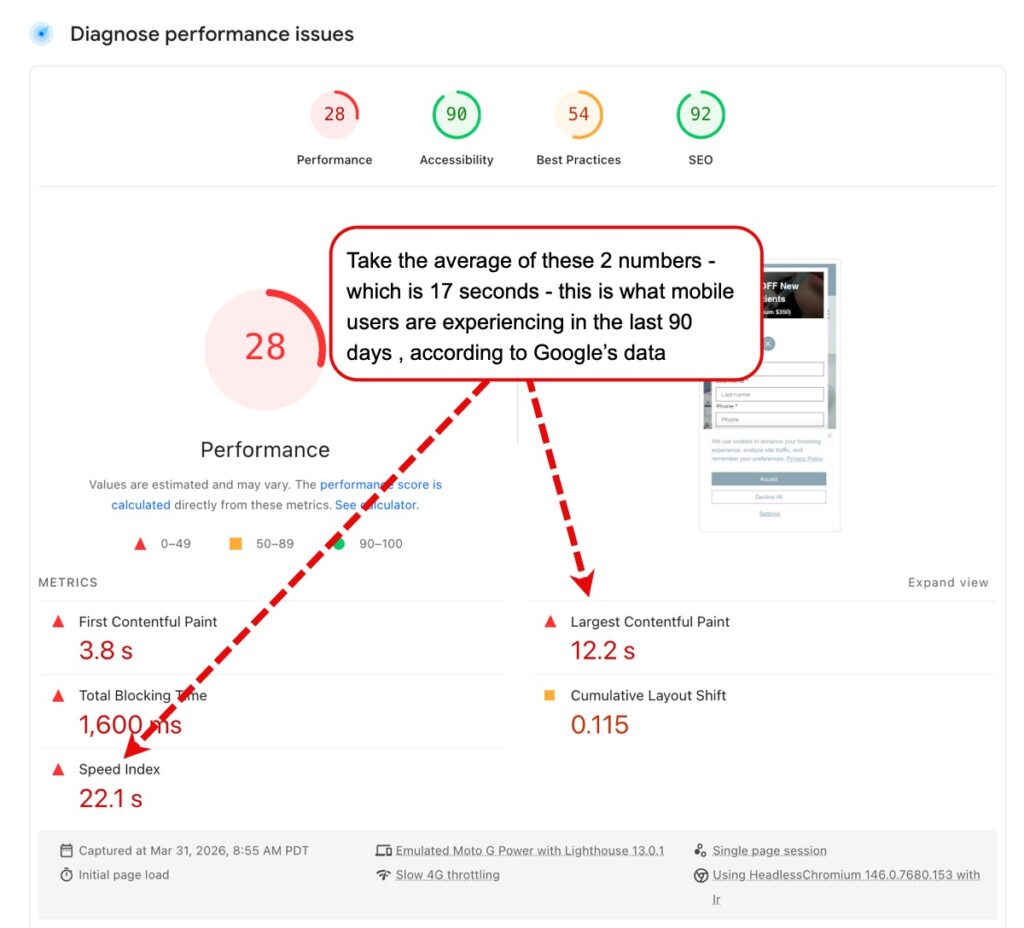
Custom websites for healthcare practices provide tailored, HIPAA-compliant online platforms designed to increase patient engagement and build trust. Key features include secure, responsive design, patient portals, and SEO optimization to improve local visibility. Costs typically range from $5,000 to over $20,000, depending on complexity, branding, and functionality, such as online leads capture and leads-funnel apps with AI based Quick-Respond apps. These websites and all apps must be HIPAA compliant, and the builder must provide you with a HIPAA BAA. Any website can look “pretty” but it must load very fast on mobile devices. According to Google’s page test, it should load within 4 seconds or less. See an example below. This website loads in 2 seconds, hence it has high conversion rates.
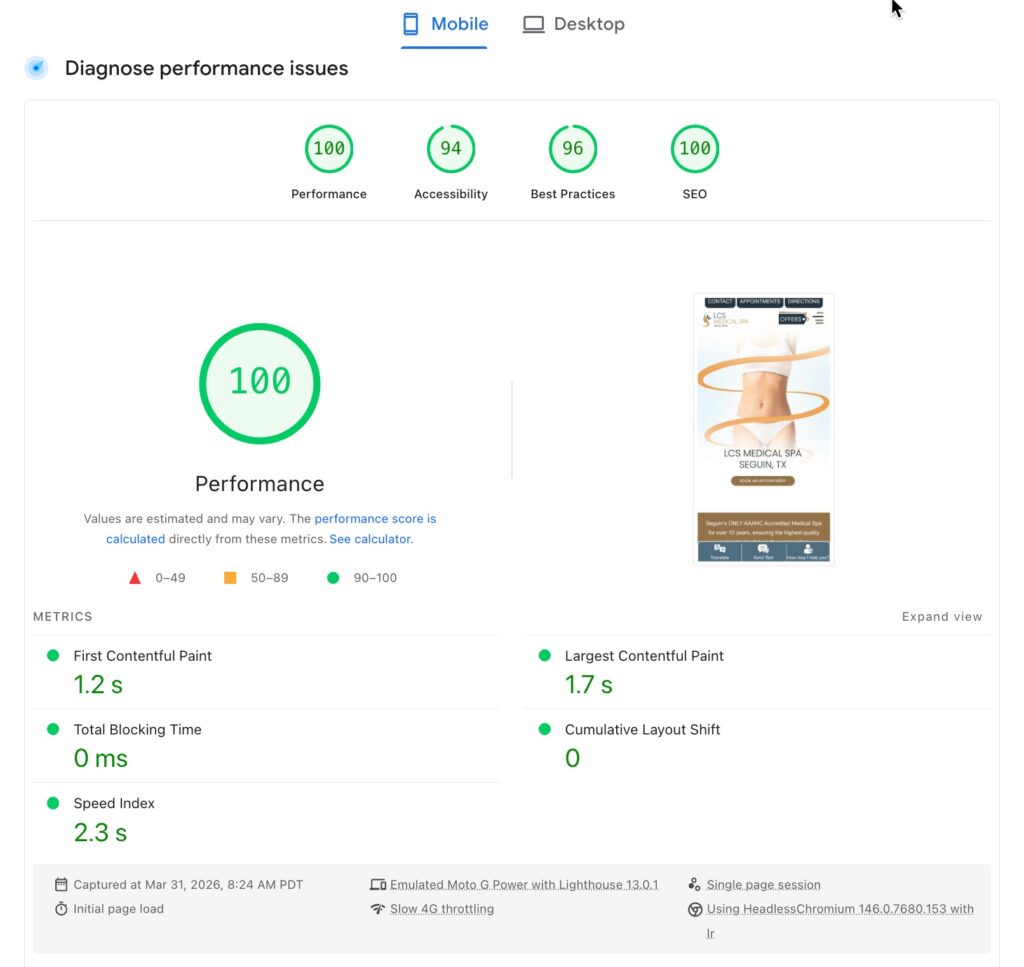
Compare to this very nice looking website: According to Google’s page test, it should load within 4 seconds or less. See an example below. This website loads in 17 seconds, hence it has very low conversion rates.
What are the key steps in developing a custom healthcare website?
Developing a custom healthcare website is a multi-step process that requires careful planning, compliance with regulations (like HIPAA), and consideration of patient needs. The goal is to create a site that provides a seamless experience for patients while also fulfilling the specific needs of the healthcare practice.
Here are the key steps involved in developing a custom healthcare website:
1. Define Goals and Objectives
- Identify Purpose: Is the website designed to provide patient education, drive new patient acquisition, or offer patient management tools (e.g., appointment scheduling, patient portals)?
- Target Audience: Define whether you are targeting new patients, existing patients, or both. Understanding your audience helps tailor content and design.
- Compliance Requirements: Ensure that the website meets HIPAA and other relevant regulations regarding privacy and data security.
2. Conduct Market and Competitor Research
- Analyze Competitors: Look at other healthcare websites in your area and field. What works well? What can be improved?
- User Research: Understand the needs and preferences of patients. Consider their device usage (mobile vs. desktop) and technical familiarity.
- Industry Trends: Stay up to date on trends like telemedicine, online booking, and patient portals that could be valuable for your site.
3. Develop a Site Map and Wireframe
- Site Map: Outline the structure of the website, including major sections like Home, About Us, Services, Appointments, Contact, Blog, Patient Portal, and Patient Resources.
- Wireframe: Create a basic layout (sketch or digital) of the site. This includes the navigation, placement of elements, and how content flows. Wireframes help visualize how users will interact with the site.
4. Design the User Interface (UI) and User Experience (UX)
- Responsive Design: Ensure the site is mobile-friendly and accessible across all devices (phones, tablets, desktops).
- Branding: The design should reflect the practice’s branding, including colors, fonts, logos, and tone. The design must convey trust, professionalism, and accessibility.
- Patient-Centered Design: Consider user needs:
- Easy navigation to key information (services, contact, appointment scheduling).
- Intuitive layout so patients can quickly find what they need.
- Accessibility for people with disabilities (e.g., screen readers, easy font sizes).
5. Select the Right Content Management System (CMS)
- Choose a CMS that allows for easy content updates. For healthcare sites, WordPress is a popular choice because it is user-friendly, flexible, and supports HIPAA-compliant plugins.
- Custom CMS: If your site needs very specific functionalities, you may have to consider custom CMS. However, this will require huge expense and whenever you use a custom CMS, there are less and less experts and your options are very limited if you have to change service providers.
6. Incorporate Key Healthcare Features and Functionalities
- Appointment Scheduling: Integrate a scheduling system that allows patients to book, cancel, or reschedule appointments online. The system should also sync with your practice’s calendar.
- Patient Portal: Include a secure patient portal link where patients can access their medical records, test results, and prescriptions.
- Online Forms: Add HIPAA-compliant online intake forms, consent forms, and medical history questionnaires.
- Telemedicine Integration: For practices offering telehealth, integrate video conferencing tools like Zoom for Healthcare or Doxy.me.
- Insurance Information: Include a section to allow patients to verify insurance coverage and get cost estimates.
- Consider adding SPOC app from PatientGain.com. The SPOC (Single Point of Contact or Single Point of Conversion) app from PatientGain is a HIPAA-compliant, AI-driven unified inbox designed for medical and dental practices. It centralizes all patient inquiries—from website forms, chatbots, phone calls, texts, and social media—into one secure dashboard.
7. Ensure HIPAA Compliance and Security
- Data Encryption: Ensure all sensitive data is encrypted during transmission and storage to protect protected health information (PHI).
- Secure Hosting: Host the website on HIPAA-compliant servers that meet security requirements like regular backups and firewalls.
- SSL Certificates: Use SSL (Secure Sockets Layer) to encrypt communications and ensure secure connections between the website and users.
- Access Control: Implement role-based access control for staff, so only authorized personnel can view sensitive information.
- Consent Management:
8. Optimize for SEO and Local Search
- SEO Best Practices: Optimize the website for search engines by using targeted keywords, creating valuable content, and having well-structured metadata (titles, descriptions, header tags).
- Local SEO: Healthcare practices rely heavily on local search (e.g., “dentist near me” or “urgent care in [city]”). Make sure to optimize your Google My Business listing and integrate it with the website.
- Content Strategy: Develop a content strategy for ongoing fresh services based content or patient resources that answer frequently asked questions, provide health tips, and highlight services offered.
9. Develop Content for the Website
- Patient-Focused Content: Write clear, easy-to-understand content focused on patient needs and concerns. This includes information about services, doctors, insurance, and patient experiences.
- Educational Resources: Include articles, videos, or downloadable PDFs related to healthcare topics relevant to your practice. This builds trust and helps with SEO.
- Clear Call-to-Actions (CTAs): Use CTAs like “Book an Appointment”, “Contact Us”, or “Learn More” to drive visitors toward conversion.
10. Test the Website Thoroughly
- User Testing: Run usability tests to ensure that patients can easily navigate the site. Test for accessibility, page load speed, and mobile responsiveness.
- Security Testing: Perform security audits and penetration testing to ensure the site is secure against threats and vulnerabilities.
- HIPAA Compliance Testing: Perform HIPAA compliance audits to ensure that the website meets all necessary legal requirements for data protection and privacy.
11. Launch and Monitor Website Performance
- Launch: Once everything is tested and working, launch the site and monitor it for any technical issues.
- Analytics: Use tools like Google Analytics to track user behavior, conversion rates, and page performance.
- Monitor Security: Regularly monitor for security breaches and vulnerabilities.
12. Ongoing Maintenance and Updates
- Content Updates: Keep the website up-to-date with the latest information about your practice (e.g., services, team members, hours of operation).
- Software Updates: Ensure that the CMS and any plugins are kept up to date to avoid security vulnerabilities.
- Compliance Audits: Regularly perform audits to ensure the website remains HIPAA-compliant and secure.
Example 1: Custom website design

Does PatientGain.com builds custom websites for healthcare practices?
Yes, PatientGain.com does offer custom website development for healthcare practices, there are 2 type of websites offered by PatientGain 1) Full Custom and 2) Semi-Custom – Included with the PLATINUM service. While PatientGain is well-known for its turnkey, ROI-focused websites that include automated patient engagement, marketing tools, and HIPAA compliance, it also provides custom solutions for practices looking for more tailored and specific website features. The cost of full custom websites starts at $8000 one time setup. However, it can be higher, if you have a lot of iterations and changes.
1. Custom Design and Branding
- Tailored Design: PatientGain works with practices to create a custom-designed website that reflects the practice’s unique brand. This includes custom layouts, color schemes, and branding elements that resonate with the practice’s identity.
- Patient-Centered Focus: The design is optimized for user experience (UX), ensuring the website is intuitive, easy to navigate, and patient-friendly. This is crucial for healthcare practices where clarity and simplicity in design can improve conversion rates.
2. Fully HIPAA-Compliant Websites
- Data Security: PatientGain ensures that all websites are HIPAA-compliant, providing secure data collection forms, appointment scheduling systems, and patient portals that meet privacy regulations.
- Patient Data Protection: Custom websites include encrypted connections, protected patient data storage, and secure communication between the website and practice management systems.
3. Custom Functionalities and Integrations
- Custom Workflows: PatientGain designs websites with specific workflows for patient intake, booking, and engagement, tailored to the needs of the healthcare practice. This could include custom appointment booking systems, insurance verification, or specialized forms (e.g., consent forms).
- Integration with EMRs/Practice Management Systems: The custom websites integrate smoothly with the practice’s existing EMR/PM system (like OpenEMR, Epic, etc.), syncing patient data for a seamless experience. PatientGain can also integrate with systems like telemedicine solutions, payment gateways, and patient communication tools.
4. Search Engine Optimization (SEO)
- SEO-Optimized Design: PatientGain ensures that custom websites are built with SEO best practices in mind. This includes fast load times, mobile responsiveness, local SEO optimization, and the use of keyword-rich content that helps the website rank well on search engines (especially for local healthcare queries).
- Ongoing SEO Support: In addition to the initial SEO optimization, PatientGain offers ongoing SEO management as part of its PLATINUM service, ensuring continuous improvements in search rankings.
5. Integrated Patient Engagement Tools
- Automated Marketing and Lead Conversion: Custom websites include tools for automated email marketing, SMS reminders, and patient follow-ups. These systems are designed to improve patient acquisition and retention, all without needing extra staff time.
- Live Chat and AI Integration: PatientGain also integrates AI-powered chatbots for patient inquiries, appointment scheduling, and pre-qualification. These chatbots can hand off to a human agent if needed, ensuring a smooth, personalized experience.
6. Mobile-Optimized Websites
- Responsive Design: Since most patients will visit your healthcare website on mobile devices, PatientGain ensures that custom websites are fully responsive and optimized for all screen sizes, offering a seamless experience across smartphones, tablets, and desktops.
7. Performance Tracking and Analytics
- Conversion Tracking: PatientGain integrates analytics tools to track the performance of the custom website. This includes data on how patients interact with the site, where they drop off, and which pages lead to appointments or other desired actions. These insights help improve patient conversion rates over time.
- Custom Reporting: Practices can access custom reports that track key metrics like patient acquisition, ROI on marketing spend, and patient retention.
8. Support and Maintenance
- Ongoing Updates and Support: PatientGain provides ongoing website support and maintenance to ensure the site remains secure, updated, and fully functional. This includes security patches, content updates, and feature enhancements.
- Training: The team also provides training for staff to manage the website content and tools, empowering practices to make updates independently.
Key Benefits of PatientGain’s Custom Websites
- Tailored to Your Practice: Custom designs and features ensure that your website fits your specific needs.
- HIPAA-Compliant and Secure: Security is a top priority, with all data collection and communication systems adhering to HIPAA regulations.
- Automated Patient Engagement: Increase patient conversions without extra staff effort.
- Ongoing SEO and Performance Optimization: Build long-term visibility and trackable results.
- Multi-Location Support: For practices that have multiple locations, PatientGain provides the ability to manage all sites centrally, ensuring consistent branding and messaging.
 Send Text
 How may I help you?