

Reputation Management For Multi-Location Healthcare Practices
For medical groups and multi-location practices, online reviews serve as the modern equivalent of word-of-mouth referrals at an enterprise scale. Because these organizations manage multiple doctors, specialties, and physical facilities, patient feedback directly impacts everything from local search discoverability to corporate risk management. For a medical group operating 5, 10, 25, or even 100 locations, online patient reviews are much more than a reputation management issue. They directly influence patient acquisition, local Google visibility, patient trust, appointment opportunities, and the perceived credibility of the entire medical group.
Why is reputation management for multi-location practices important?
For medical groups with 10, 20, or 50+ locations, the more valuable takeaway is that online reputation management is also an operational intelligence tool. It can help regional managers identify recurring patient-service issues across clinics, rather than focusing exclusively on increasing Google star ratings.
As a Practice Manager or Owner, an online reputation management (ORM) service like ReputeMD serves as a real-time, unsolicited quality assurance dashboard. While the marketing team uses it to attract new patients, you can use the backend analytics to diagnose broken clinic workflows, manage staff performance, and protect your bottom line.
1. Staff and Provider Accountability
Patient reviews often name names or specify roles, giving you direct insight into personnel performance that you cannot observe when you are in your office.
- Targeted 1-on-1s: Set up keyword alerts for terms like “receptionist,” “nurse,” “billing,” or specific staff names. Use positive mentions as objective criteria for bonuses or employee-of-the-month awards. Use negative mentions to drive specific, data-backed retraining during performance reviews.
- Provider Benchmarking: If you manage a multi-provider clinic, filter sentiment data by physician. You may discover that Dr. Smith consistently generates 5-star reviews for bedside manner, but 2-star reviews for punctuality, while Dr. Jones is the opposite. This allows you to adjust Dr. Smith’s scheduling template to longer appointment blocks, directly solving the operational bottleneck.
2. Process and Workflow Optimization
Aggregated review data reveals systemic failures in your patient journey before they show up in your monthly financial or attrition reports.
- Diagnosing Scheduling Bottlenecks: Cross-reference complaints about “wait times” with the day of the week and time of day. If negative reviews consistently spike for Wednesday afternoon appointments, you have a concrete operational directive to audit Wednesday’s staffing levels or double-booking practices.
- Fixing the Revenue Cycle: Set alerts for keywords like “surprise bill,” “hidden fee,” “insurance,” or “collections.” Spikes in these terms indicate a failure at the front desk regarding pre-visit financial counseling or insurance verification. You can immediately initiate a workflow change, requiring the front desk to provide standardized fee estimates before the provider enters the exam room.
- Facility Audits: Track mentions of environmental factors (“cold,” “dirty bathroom,” “confusing parking”). This gives you immediate ammunition to renegotiate with your commercial cleaning vendor or update the wayfinding instructions in your automated appointment reminders.
3. Real-Time Service Recovery
Traditional patient satisfaction surveys (like HCAHPS or internal paper forms) often have a lag time of weeks or months. An ORM app alerts you instantly, allowing you to salvage a patient relationship before it results in churn.
- The 24-Hour Rule: When a 1- or 2-star review hits the dashboard, it is an immediate operational escalation. Calling a frustrated patient within 24 hours to say, “I am the Practice Manager, I saw your feedback, and here is how I am fixing the issue,” frequently results in the patient voluntarily updating their review and remaining loyal to the practice.
The Practice Manager’s ORM Playbook – Ten ways You can use patient reviews to improve clinic
| Area | Intelligence I can gather | What I can do |
|---|---|---|
| 1. Front desk | Complaints about staff interactions | Improve training and check-in procedures |
| 2. Appointment scheduling | Patients cannot find appointments | Adjust scheduling rules and capacity |
| 3. Wait times | Repeated reports of long waits | Compare scheduling with actual visit times |
| 4. Phone management | Patients cannot reach the office | Audit missed calls and staffing patterns |
| 5. Billing | Unexpected bills and payment confusion | Review billing accuracy and explanations |
| 6. Provider communication | Patients feel rushed or uninformed | Provide communication coaching and support |
| 7. Follow-up process | Complaints about delayed callbacks or referrals | Improve follow-up accountability |
| 8. Patient retention | Patients say they may not return | Identify and resolve recurring dissatisfaction |
| 9. Location performance | One location receives more complaints | Compare workflows across clinics |
| 10. Staff recognition | Repeated praise for employees | Recognize excellent service and share best practices |
Importantly, review comments describe patient perceptions. They should trigger investigation rather than automatically being treated as proof of staff misconduct, clinical errors, or poor care.
What is the pricing of “done-for-you” reputation management for multi-location practices?
PatientGain offers tiered discounts and referral incentives for the ReputeMD app and its full software suite.
Provider & Location Volume Discounts
| Package Type | Scope | Discounted Cost |
|---|---|---|
| 4 Providers Package | Small-to-medium practice | $300/month total (Saves $100/mo; reduces rate to $75/mo per provider) |
| 10 Providers Package | Medium practice | $600/month total (Saves $400/mo; reduces rate to $60/mo per provider) |
| Multi-Location Packages | 3 or more clinic locations – large bundles | $500/month per location (Includes up to 30 providers total across locations) |
| Enterprise Packages | Up to 200 locations | Custom enterprise tier (No limit on the total number of providers) |
Why online reviews for the clinics are critical for medical groups?
For a single-location clinic, a poor Google rating can hurt that clinic’s ability to attract new patients. For a multi-location medical group, the problem is more complex: one location may have an excellent reputation while another location damages the brand and loses prospective patients to competitors. The central business issue: A medical group’s corporate reputation does not automatically guarantee patient trust at every individual location. Each clinic must earn that trust in its own local market.
Key business reasons online reviews matter
1. Patients compare clinics before booking appointments
Patients increasingly evaluate Google star ratings, recent reviews, and individual patient experiences before contacting a clinic. A highly rated competitor may win a patient even when your practice offers comparable medical services. Research summarized by the American Marketing Association found that physician ratings influence patient selection and are associated with patient volume.
2. Online reviews influence Google Maps and local SEO
Google explicitly confirms that review quantity and positive ratings can contribute to local rankings. Medical groups therefore need to optimize the Google Business Profile of every eligible location, not just the corporate website. Relevance and distance also remain major ranking factors.
3. Reviews establish patient trust before the first visit
Prospective patients cannot easily evaluate clinical expertise in advance. They look for signals of professionalism, empathy, communication, and responsiveness. Positive, credible reviews reduce uncertainty, although they cannot guarantee clinical quality.
4. Every location has its own local reputation
A 20-location medical group effectively competes in 20 local markets. Patients searching for a dermatologist, urgent care clinic, or mental health provider typically see nearby locations rather than a single corporate reputation score.
5. Better reviews can improve patient acquisition efficiency
A clinic with stronger reviews may convert more website visitors and local searchers into calls and appointments. This can improve returns from SEO and paid advertising without increasing advertising spend. The actual financial impact must be measured.
6. Reviews help patients evaluate individual physicians
Patients may research both the medical group’s brand and the individual physician. Negative feedback concerning physician communication, staff behavior, or appointment experiences can influence their selection decisions.
7. Reviews reveal operational problems
Recurring complaints about unanswered phones, long wait times, scheduling difficulties, billing confusion, or front-desk behavior help regional managers identify service problems before they become widespread.
8. Reviews provide publicly available signals for AI search
AI search and recommendation systems can encounter online review information when comparing healthcare providers. Review content may affect how a clinic is described or recommended, but there is no verified universal formula showing that specific review counts or ratings guarantee AI recommendations.
9. Review responses demonstrate accountability
A professional response signals that management takes concerns seriously. A 2024 study found that physician responses can reduce the negative influence of critical reviews on consumer selection intentions.
10. Reputation becomes a measurable management KPI
Leadership can compare review ratings, recent feedback, complaint categories, and response performance across clinics. This supports better regional oversight, operational improvements, and resource allocation.
Does PatientGain have experience & solutions to manage multi-location practices’s reputation management?
PatientGain offers specific applications designed to manage online reputation for multi-location medical practices and DSOs. Their platform is HIPAA-compliant and consolidates review generation, monitoring, and video testimonials into a single dashboard. PatientGain’s solution data shows that best results are achieved when practices Use Email, Texting/SMS, QR Codes in Lobby, Facebook and In-Lobby Reviews Apps.
PatientGain addresses multi-location reputation through two primary applications:
1. ReputeMD App (Review Generation)
ReputeMD is an automated, “Done-For-You” service designed to increase the volume, velocity, and recency of reviews across platforms like Google and Yelp.
- Automated Outreach: The app automatically sends SMS or email review requests to patients after their visits. This mathematical approach dilutes negative reviews by ensuring the high volume of satisfied patients actually leave feedback.
- HIPAA-Compliant Internal Feedback: When patients receive a review request, they also have the option to fill out an internal survey. If a patient leaves negative feedback on the internal survey, ReputeMD immediately alerts practice managers so they can address the issue offline. However, to comply with Google’s guidelines against “review gating,” all patients still receive the same initial link to leave a public review.
- SEO Alignment: The app is designed to feed local search algorithms the data they favor: high average ratings, continuous review velocity, and detailed feedback that includes long-tail keywords about specific symptoms or treatments.
2. PatientReel App (Video Testimonials)
PatientReel is a specialized application that allows clinics to securely collect, edit, and publish video testimonials without requiring in-house video production.
- Frictionless Recording: Staff send a secure link via SMS or email to a satisfied patient. The patient signs a digital HIPAA authorization natively on their device (laptop, computer, smartphone) and records a short video on their own device, in their own time.
- Automated Editing: The application automatically edits the footage and adds closed captions. Practice managers review the final cut and approve it for publishing directly to the practice’s website.
- Cost Savings: By eliminating the need for professional videographers or asking front-desk staff to edit raw video, PatientGain estimates the app saves significant administrative labor and production costs over a 12-month period.
Both applications operate under a Business Associate Agreement (BAA) to ensure patient data is encrypted and handled in compliance with medical privacy laws. More importantly, PatientGain is a healthcare-specific reputation management system rather than simply a generic Google review collection tool.
There is also published evidence of multi-location client implementations, although PatientGain’s reported results and experience claims should be distinguished from independently verified customer outcomes.
1. PatientGain’s reputation management applications
| App or service | What it does | Benefit for multi-location groups |
|---|---|---|
| ReputeMD™ | Automates patient review invitations by text and email | Generates reviews for individual clinics |
| EMR-Xtract | Connects patient information workflows with EHR/EMR data | Reduces manual front-desk work |
| PatientReel | Supports video testimonials with authorization workflows | Builds patient trust and marketing content |
| QuickSend | Supports templated communication and responses | Helps maintain consistent messaging |
| Centralized Reputation Dashboard | Monitors reviews and performance across locations | Gives regional managers and executives oversight |
| Managed Reputation Services | Provides ongoing marketing and reputation support | Reduces the burden on clinic staff |
2. What makes PatientGain particularly relevant for a large medical group?
Centralized management of multiple Google Business Profiles
PatientGain offers a consolidated review feed, location comparisons, response management, and review-performance leaderboards. A corporate team can monitor underperforming locations without manually visiting every Google Business Profile.
PatientGain: HIPAA Compliant Marketing
Automated review invitations after patient visits. PatientGain EMR-connected workflows that can trigger invitations following a patient checkout, reducing the need for staff to manually request reviews. Actual automation depends on the practice’s EMR integration and available data feeds.
Corporate visibility with local accountability
Multi-location approach includes corporate reporting, individual location dashboards, and restricted access for practice managers. This lets the medical group standardize strategy while keeping individual clinics accountable.
Healthcare privacy focus and BAA availability
PatientGain offers HIPAA-focused workflows and a Business Associate Agreement at no additional charge for ReputeMD. This is important when handling patient contact data.
How does the automation works?
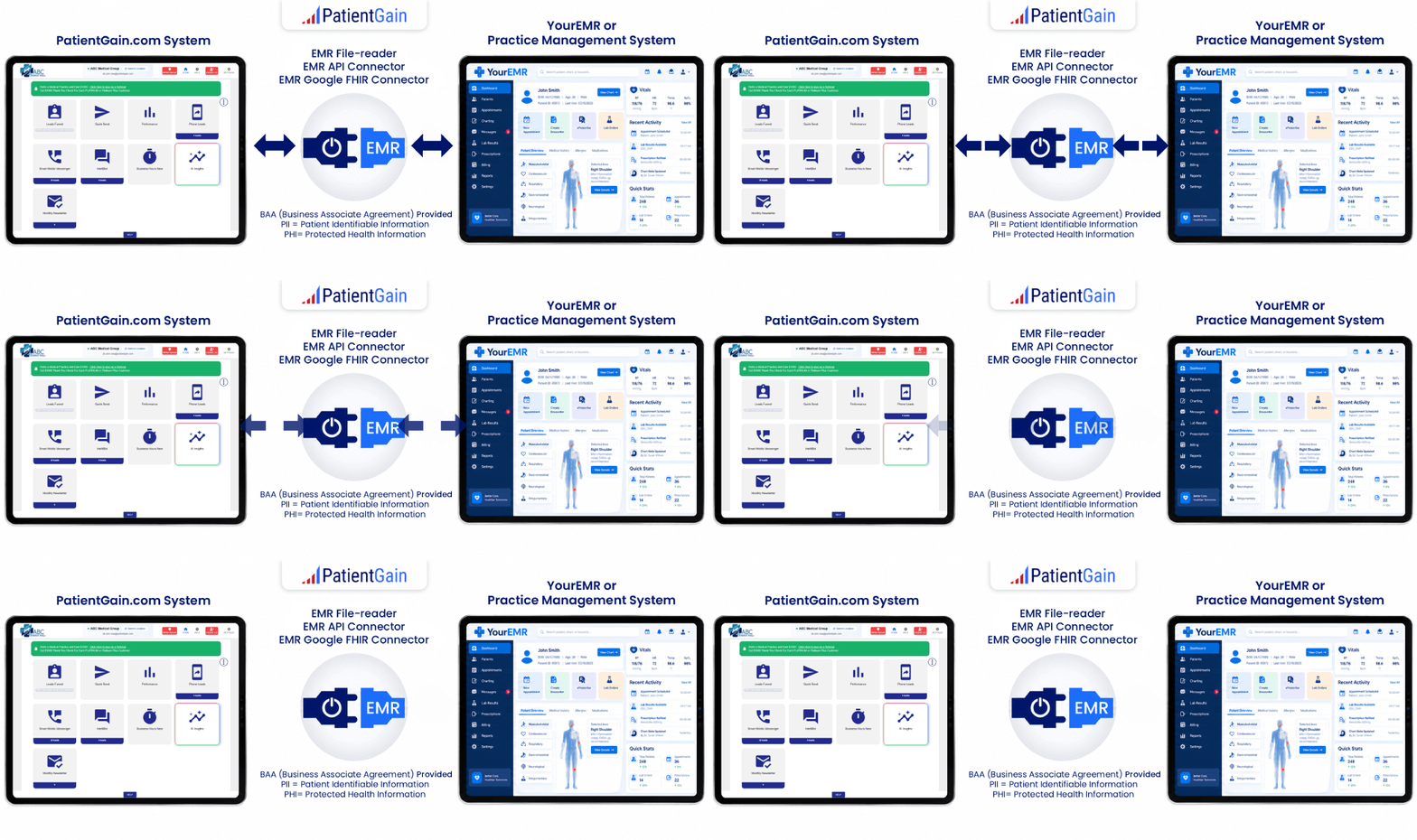
To make automated review requests entirely touchless for your staff, PatientGain uses a proprietary software integration tool called the EMR-Xtract Connector. This tool functions as a secure, HIPAA-compliant bridge between your backend Electronic Medical Record (EMR) or Practice Management (PM) system and the ReputeMD app.
Instead of requiring your office staff to manually export files or type patient phone numbers into a dashboard, the system automates the process using two primary methods:
1. Real-Time API Connections
For cloud-based EMR platforms (such as AdvancedMD, OpenEMR, and others), PatientGain hooks directly into the software’s developer API.
- The Workflow: Your staff checks out a patient exactly how they always do inside your EMR.
- The Trigger: The moment the appointment status is marked as “Completed” or “Checked Out” in your system, the API instantly syncs that specific contact information to ReputeMD.
- The Result: The system automatically schedules or sends the text message review request based on the timing rules you set (e.g., 2 hours after checkout) without your staff lifting a finger.
2. HL7 Data Feeds
For legacy, on-premise, or server-based EMR systems that do not use modern web APIs, the connector utilizes an HL7 (Health Level 7) data stream.
- The Workflow: When a provider concludes a clinical encounter or a front-desk staff member hits “save” on a patient checkout, your EMR generates an automated administrative message.
- The Trigger: The EMR-Xtract tool securely intercepts that scheduling or check-out feed over an encrypted HTTPS connection.
- The Result: The patient data is extracted, scrubbed for duplicates, and used to immediately trigger the review request workflow.
Hand-Off and Security
Because moving medical records to a patient engagement app is a high-stakes task under privacy laws, PatientGain handles the setup on your behalf. The PatientGain technical staff coordinates with your practice to secure API credentials or establish the feed. Once implemented, the connector runs completely in the background under an official Business Associate Agreement (BAA), fully encrypting data both in transit and at rest.
Examples of EMR and HL7 (Health Level 7) data feeds
Most on-premise, server-based, and enterprise EMR systems support HL7 (Health Level 7) data feeds. Because HL7 v2 has been the universal “languages of healthcare” since the 1990s, nearly every major medical software vendor builds native HL7 capability into their platforms to send real-time clinical and scheduling data to outside programs.
Why most practices use the HL7 (Health Level 7) data feeds?
- Cost
- Complete segregation from the EMR vendor
- Time-to-Market
Most practices rely on HL7 data feeds for these specific reasons because healthcare IT is notoriously rigid, expensive, and slow to change.
The breakdown of how Cost, Complete segregation from the EMR vendor, and Time-to-Market drive practices to choose HL7 feeds over other integration methods highlights these advantages:
1. Cost (Avoid Premium Vendor Lock-in)
- The Problem: Many legacy EMR vendors charge massive, ongoing monthly or annual fees just to open up their modern API keys for third-party apps like PatientGain.
- The HL7 Solution: Most server-based or older EMR platforms already have an outbound HL7 interface built into the software license you bought years ago. Using an existing HL7 stream allows a practice to connect its reputation management or patient communication apps without paying the EMR vendor tens of thousands of dollars in “premium cloud connection” upgrade fees.
2. Complete Segregation from the EMR Vendor (Data Privacy & Control)
- The Problem: When you give a third-party app direct API access, that app often plugs deeply into your live database, which creates security concerns, potential lag, and reliance on the vendor’s cloud server stability.
- The HL7 Solution: HL7 feeds operate on a “push” architecture, meaning your EMR simply shoots out an encrypted data packet (like a one-way text message) to PatientGain whenever a patient checks out. The external software never digs around inside your live EMR database. This complete segregation keeps your primary patient records isolated and secure, satisfying strict IT compliance departments.
3. Time-to-Market (Faster Setup)
- The Problem: Building a custom web API connection or waiting for an EMR vendor’s corporate approval queue to clear can take months—sometimes even up to a year.
- The HL7 Solution: Because HL7 v2 is a universally understood formatting standard, software technical teams don’t have to write custom code from scratch. Tools like PatientGain can read a standard HL7 message instantly. This standardized data layout drastically cuts down setup times, allowing your touchless automated text messages to go live in days rather than months.
The primary server-based and hybrid EMR systems that frequently use HL7 feeds to automate tools like PatientGain’s ReputeMD include:
1. eClinicalWorks (On-Premise & Cloud Hybrid)
While eClinicalWorks has cloud options, a massive percentage of its user base runs on private or local servers.
- The Feed Used: It natively outputs standard HL7 SIU (Scheduling Information Unsolicited)messages.
- How it helps your staff: The moment an appointment status is updated to “Checked Out” or “No Show” in eClinicalWorks, the system pushes an HL7 message. PatientGain intercepts this feed to trigger or suppress a review text instantly.
2. NextGen Enterprise
NextGen is heavily relied upon by mid-to-large multi-provider groups and frequently utilizes server-based architectures.
- The Feed Used: NextGen owns NextGen Connect (formerly Mirth Connect), which is one of the most widely used healthcare integration engines in the world.
- How it helps your staff: NextGen Connect translates internal scheduling data into HL7 v2.3 or v2.5formatting. It can route a continuous stream of patient checkout data directly to your reputation software seamlessly in the background.
3. Altera Digital Health (Formerly Allscripts TouchWorks)
TouchWorks generally serves large ambulatory practices, faculty plans, and health systems that maintain complex infrastructure.
- The Feed Used: They deploy HL7 v2.x interfaces alongside their modern APIs.
- How it helps your staff: Certified interface analysts can configure TouchWorks to generate outbound demographic and checkout data packets. These packets automatically notify your marketing app that a patient has left the building and is ready to be texted.
4. Enterprise Hospital EMRs (Epic, Oracle Cerner, MEDITECH)
If your clinic is owned by or closely tied to a hospital network using an enterprise system, they heavily rely on HL7 rails for their high-throughput clinical event streams.
- The Feed Used: They use HL7 ADT (Admission, Discharge, Transfer) messages.
- How it helps your staff: The “Discharge” or “Transfer” message acts as the hands-off signal that safely passes the patient’s phone number to your automated review system.
What About Cloud-Native EMRs?
If you use cloud-native platforms like athenahealth, AdvancedMD, or Modernizing Medicine, they canuse HL7, but they usually provide a RESTful Developer API or FHIR API instead. These work just as smoothly for your staff and achieve the exact same touchless result.
The EMR-Xtract Connector is included as a core feature inside the ReputeMD standalone app and comes standard with PatientGain’s higher tier comprehensive service plans.
 Send Text
 How may I help you?