

What is Full Service HIPAA Compliant Email Marketing? PatientGain Creates Monthly Content, Messaging, Delivery – Your Staff SImply Approves. Designed For Doctors & Dental Practices
Healthcare Email Campaigner-499 – This monthly service is for all healthcare providers (medical & dental). Costs,$499/month for up to 10k contacts, and includes 3 campaigns per month, done for you – Your staff can focus on patients. You supply the patient Emails, PatientGain takes care of the rest. Creation of the messaging, content and you simply need to “approve” the final campaign.
$499/mon + 10K Contacts. No Setup Fees + Content Included Ready-To-Go Service
If your clinic lacks the time or in-house marketing expertise and requires secure, HIPAA-compliant patient Email marketing communication, PatientGain takes the operational burden off your staff. If you have a dedicated marketing team that wants total creative control and flexibility of DIY campaigns, then you want to use a system where your staff creates and sends Email campaigns – typically 3 times a month, ideally 36 campaigns each year.
Every month, practice managers from medical and dental practices contact PatientGain and ask us these typical questions:
Full Service HIPAA Compliant Email Marketing: Table of Contents
Question 2) Does PatientGain offers HIPAA compliant Email Marketing service?
Question 3) How much is HIPAA compliant Email Marketing service from PatientGain?
Question 4) My staff does not have time to create Email Marketing every month, can you do it for me?
Question 5) Examples of Content Created By PatientGain’s Full Service Email Marketing
Question 6) Will I get human support if I have questions?
Question 7) What are different categories of Emails?


Question 1) Do I need to use HIPAA compliant Email Marketing service? or can i use any generic/general Email marketing service?
Yes, healthcare practices must use HIPAA-compliant email marketing, like PatientGain, because even “generic” newsletters often contain or imply Protected Health Information (PHI). While HIPAA allows email marketing, it must be conducted under strict security and privacy standards to protect patient data.
Full Service HIPAA Compliant Email Marketing is a specialized digital marketing service that manages healthcare promotional campaigns while strictly adhering to federal privacy regulations. Because patient email addresses and names are classified as Protected Health Information (PHI), agencies offering these services ensure all email infrastructure, content, and data handling meet strict security safeguards. Core Components of the Service:
- Business Associate Agreements (BAAs): The full service HIPAA compliant Email marketing company legally assumes responsibility for protecting PHI by signing a BAA with the healthcare provider.
- Data Encryption: The patient Email database is protected. This database keeps patient’s Emails, and names.
- Patient Consent Management: The service tracks which patients have explicitly opted-in to receive marketing communications.
- Strict Content Reviews: Ensuring emails do not inadvertently expose PHI without required written authorization. PatientGain creates the campaign, and the final Emails are sent to tour practice manager for final review. Once they click on “Approved”, only then the campaign is sent out.
- Audit Logging & Access Controls: Monitoring who views, edits, or accesses patient databases. In addition, PatientGain records who “Approves” the final campaign. So as the practice owner, you have a peace of mind that someone from your staff has actually given the final approval.
Question 2) Does PatientGain offers HIPAA compliant Email Marketing service?
Yes, PatientGain offers HIPAA-compliant email marketing service specifically designed for medical and dental practices. Unlike generic email tools like Mailchimp or Constant Contact, which generally will not secure healthcare data out of the box, PatientGain operates as a “walled garden” built entirely around patient privacy regulations.
Compliance & Data Security Features
- Business Associate Agreement (BAA): PatientGain provides a standard or custom Business Associate Agreement (BAA) to all clients, which legally protects the entire lifecycle of your patient data.
- Safe List Segmentation: Because the email marketing tool is directly wired into PatientGain’s HIPAA-Compliant CRM, you can safely segment lists based on clinical data like specific treatments, medical histories, or diagnoses without exposing Protected Health Information (PHI).
- Secure Cloud Infrastructure: All captured patient leads, names, email addresses, and phone numbers are securely hosted using Amazon Web Services (AWS) and Google Cloud servers with built-in data encryption both at rest and in transit.
- Consent Management: The email marketing platform natively integrates automated consent and opt-out workflows, ensuring your medical messaging adheres strictly to legal marketing guidelines
- PatientGain.com’s HIPAA Compliant Email Marketing Service Costs $499/mon for up to 10,000 Patient Contacts. It is Done-For-You service. There are 42+ Specialities included in this service, and thousands of conditions, treatments, and general information related to services offered by providers. Customized for your practice, branding and call-to-action, and with the help of a PatientGain’s Project Manager. Standard HIPAA BAA is included.
Question 3) How much is HIPAA compliant Email Marketing service from PatientGain?
PatientGain’s standalone HIPAA-compliant email marketing service features a promotional rate starting at $299 per month (discounted from its standard $499 per month price).
The exact cost depends on your contact volume, whether you buy it a la carte, or if you bundle it into a broader clinic marketing package.
Pricing Options Breakdown
- Standalone Email Marketing Plan ($299/mo promo, $499/mo standard):
- Covers up to 10,000 patient contacts.
- Includes up to 3 monthly emails with fully managed medical content creation. 36 campaigns per year.
- Typically requires a 6-month trial or a 12-month commitment, without setup fees.
- Platinum Email Marketing Add-on ($140/mo):
- Available for specific existing CRM databases.
- Covers roughly 8,000 contacts and includes 3 Email campaigns per month, 36 per year.
- All-In-One Full Service Bundles ($899 to $2,499+/mo):
- If you want a medical website, SEO, appointment software, and reputation tools alongside your emails, PatientGain bundles email marketing directly into their GOLD, PLATINUM, and PLATINUM PLUS full-service healthcare suites
Question 4) My staff does not have time to create Email Marketing every month, can PatientGain do it for me?
Yes, PatientGain will completely create your email marketing campaigns for you. PatientGain’s EMail marketing service is a fully managed “Done-For-You” (DFY) model specifically designed so busy clinic staff do not have to write copy, design templates, and setup for you to review – so your practice manager simply needs to review the final campaigns and click on “APPROVE”.
PatientGain’s EMail marketing service consists of AI agents, intelligence database based on your services and a human project manager.
How the Done-For-You Process Works
- Automated Content & Imagery Creation: PatientGain’s platform automatically generates up to three custom email campaigns per month, 36 campaigns per year – this happens to be the optimal number of campaigns for most healthcare practices. The content includes professional medical copy, custom graphics, and seasonal wellness promotions, tested CTAs (Call To Actions) tailored entirely to your specific clinical specialty (covering over 42+ medical and dental fields).
- Dedicated Human Management: Every medical practice is assigned a dedicated Project Manager and Technical Lead. They ensure your custom clinic branding, correct logos, and specific call-to-action links are properly embedded into every Email blast.
- Human-In-The-Loop (HILT) Approval: To ensure strict legal and clinical safety, campaigns are never sent without your eyes on them. The finalized drafts are sent directly to your practice dashboard. A designated staff member simply reviews the content and clicks “APPROVED”.
- Legal Compliance Logging: Once approved, PatientGain’s system automatically records your IP address and logs a precise legal timestamp for compliance protection before scheduling the blast.
- Automated List Maintenance: You do not need to spend time cleaning data. The software natively scrubs your contact lists, automatically eliminating duplicate addresses, bounced emails, unsubscribes, and contacts with poor sender reputation scores.
Question 5) Examples of Content Created By PatientGain’s Full Service Email Marketing
Rather than aggressive sales pitches, PatientGain focuses heavily on “soft-touch” educational material. They build campaigns around:
- Specific service education (e.g., “The Benefits of Morpheus8” or “Managing Chronic Back Pain”)
- Seasonal health advice and preventative care reminders
- Operational updates like updated holiday hours or welcoming new clinic staff
- Event based: Happy mother’s day
- Birthday cards sent to patients (You need to add DOB in the CRM)
- For PLATINUM and PLATINUM+ Customer they also get one image based, branded campaign – See examples below:
- Example of an announcement – “Rebecca is available on Saturdays” sent to all of your patients and clients by Email. With a CTA to book on Rebecca’s calendar.

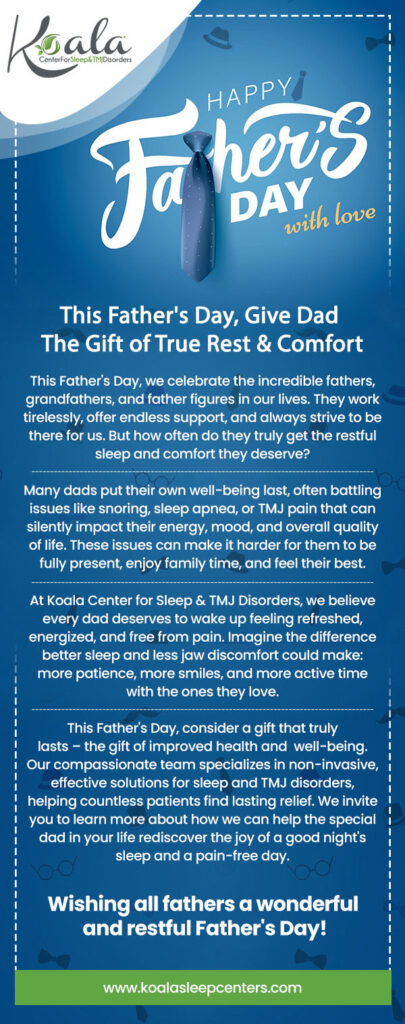
Example of Happy Father’s Day Email Blast.
Question 6) Will I get human support if I have questions?
Yes, you will receive dedicated human support if you use PatientGain. Despite the platform utilizing AI automation for marketing and routine patient workflows, PatientGain provides structured human oversight to assist their customers.
Dedicated Human Account Team
- Assigned Professionals: Every client receives an assigned Project Manager and a Technical Lead. You work with the same team consistently rather than reaching a generic help desk.
- Subject Matter Experts: Your primary contacts are backed by a broader team of clinical marketing and technical experts. For example to manage and run your Google PPC ads or Meta Ads, there is a specific team with applicable certifications to manage and run your ads.
- Escalation Path: There is no cap on how many times you can contact support; complex questions are immediately escalated to appropriate senior staff.
- Minimum Required Monthly Account Review: PatientGain requests that ALL customers meet with the assigned Project Manager once a month on a Zoom meeting.
Contact Channels
- Support Dashboards: The primary and fastest way to connect with your team is through your PatientGain Secure Dashboard.
- Text and Video Meetings: You can text your project manager directly or schedule dedicated Zoom web meetings for screen sharing and face-to-face assistance.
- Email Support: Non-urgent requests can be sent directly to your assigned project team or via PatientGain Contact Center channels.
Question 7) What are different categories of Emails?
There are generally 2 categories of Emails 1) Transaction Emails 2) Marketing Emails. In the context of healthcare, the primary difference between transactional and marketing emails lies in their purpose, trigger, and legal requirements (such as HIPAA and CAN-SPAM)
1. Transactional Emails
Transactional emails (also called triggered or functional emails) are essential messages sent to a specific individual to facilitate an already agreed-upon interaction.
- Purpose: To provide critical information or updates related to a user’s specific action.
- Trigger: Automated and sent immediately after a user action (e.g., signing up, making a payment).
- Examples:
- Medical: Medication reminders, lab test results, or appointment confirmations.
- General: Password resets, purchase receipts, shipping notifications, and account alerts.
- Legal Rules:
- No Opt-in Needed: Because they are considered “necessary,” you do not need prior consent to send them.
- Unsubscribe Link: Generally not required, as users cannot “opt out” of essential account updates.
2. Marketing & Promotional Emails
Marketing emails (or promotional emails) are sent to groups of people to encourage them to take a newaction, such as buying a service or joining an event.
- Purpose: Commercial—to increase brand awareness, promote sales, and generate new leads.
- Trigger: Usually scheduled or sent as one-off campaigns to segments of a mailing list.
- Examples:
- Medical: Monthly newsletters, promotions for elective services (e.g., teeth whitening), or general wellness tips.
- General: Flash sale announcements, product launches, and seasonal discounts.
- Legal Rules:
- Opt-in Required: Recipients must explicitly consent to receive these.
- Unsubscribe Link: Mandatory by law (CAN-SPAM); you must provide a clear way for users to opt out.
Key Comparison Table
| Feature | Transactional Emails | Marketing Emails |
|---|---|---|
| Recipient | One-to-one (Individual) | One-to-many (Groups) |
| Primary Goal | Inform/Facilitate | Persuade/Promote |
| Speed | Instant/Highly time-sensitive | Flexible timing |
| Consent | Not required for delivery | Explicit opt-in required |
| Unsubscribe | Not required (often omitted) | Mandatory link required |
Note on “Mixed” Content: If you add promotional content to a transactional email (like a discount code at the bottom of a receipt), the primary purpose must remain transactional. If the marketing portion becomes too prominent, the law may reclassify it as a marketing email, making it subject to opt-in and unsubscribe. PatientGain highly recommends that a healthcare practice should not mix them. If you do use mixed content, and use PatientGain service, you must use it as promotional content. Typically PatientGain does not allow mixed content campaigns.
What are different type of Emails typically sent by medical and dental practices?
Typically every healthcare provider uses the following:
- Monthly Email Marketing – newsletter campaigns – These are classified as “Marketing” emails. And there are strict guidelines. PatientGain does not allow SPAM emails, and if you have purchased a list or “exchanged” a list, PatientGain considers this as a SPAM Emails.
- Transactional Emails – Like confirming appointment. Sending 2 factor authentication.
- Secure Emails – Like sending or receiving patient’s test results.
- Personal Emails – A provider sending any personal recommendation or referral to another provider.
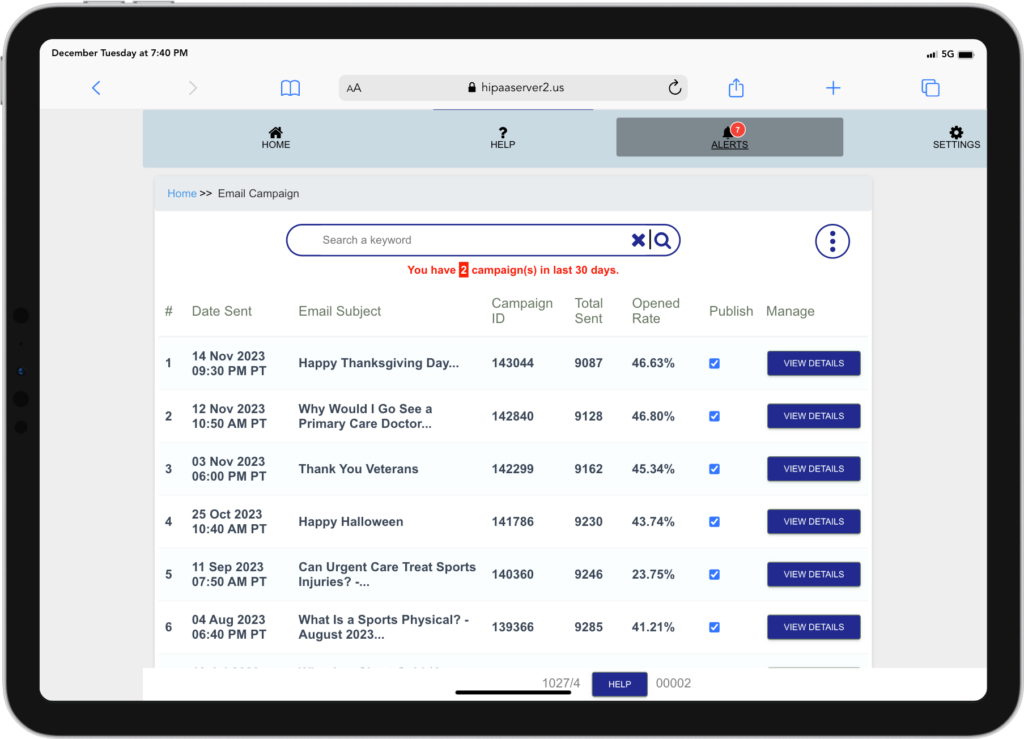
Example: Dashboard Email Marketing of a real Primary Care. You can see that November 12, Email 9128 Emails were included in the campaign. Out of the total, 46% of the newsletters were opened.
 Send Text
 How may I help you?