

What is HIPAA Compliant EMR Connector For Healthcare Practices?
A HIPAA-compliant EMR (Electronic Medical Record) is a secure software integration that allows a healthcare practice’s Electronic Medical Record (EMR) or Electronic Health Record (EHR) system to exchange patient information with other authorized healthcare applications while protecting patient privacy and supporting HIPAA compliance. This can be offered as an app (DIY) of a service, with a BAA. HIPAA Compliant EMR Connector allows an EMR system to safely exchange patient data with third-party software while strictly adhering to federal privacy and security laws. Because no single EMR can handle every administrative or clinical task perfectly, healthcare practices use these connectors to link their central record system to external tools like telehealth platforms, patient engagement apps, billing software, and communication systems without exposing Electronic Protected Health Information (ePHI). PatientGain’s EMR-Xtract connector is offered free of charge to PatientGain customers. It is also available for a standalone use also.
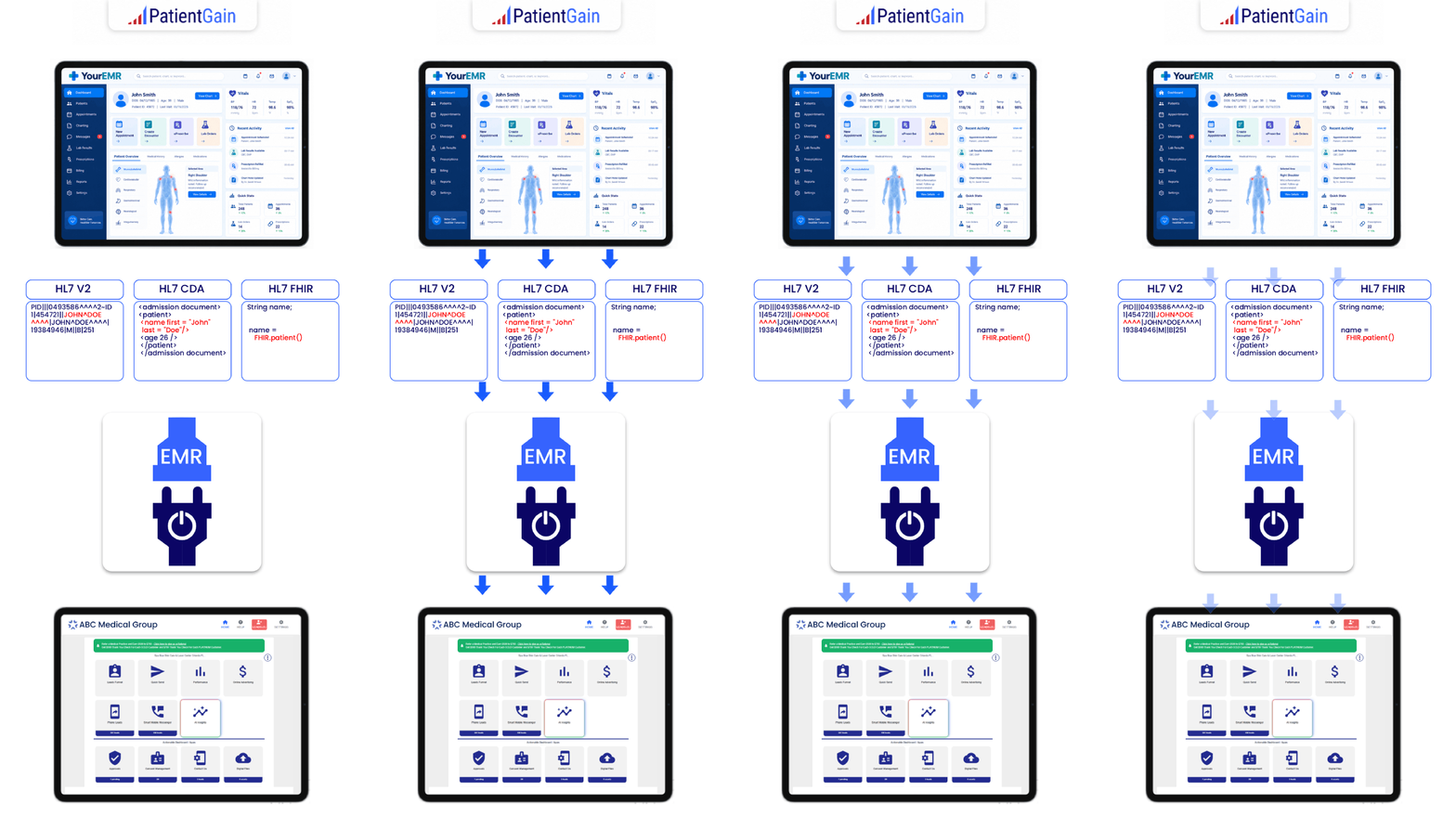
Real-world example
Imagine a patient visits a dermatology practice for a routine appointment.
- Patient appointment completed: The EMR records that the visit is finished.
- Connector receives an update: An authorized integration identifies the appointment-completion event.
- Secure data processing: The connector transfers only the information required for the approved workflow.
- Patient communication begins: A connected application may send an appropriate appointment follow-up or review request, subject to privacy, messaging, and consent requirements.
- Activity is recorded: Relevant system events and data-access activity are logged for operational and security purposes.
The result is less manual work for the practice and more consistent patient communication.
What Makes an EMR Connector HIPAA-Compliant?
A connector is not HIPAA-compliant simply because it uses an API, HL7, or encryption. Compliance depends on the overall technology, contracts, policies, safeguards, and actual use of patient data.
| HIPAA-related requirement | What it means for an EMR connector |
|---|---|
| Business Associate Agreement (BAA) | Required when the connector vendor acts as a business associate handling PHI on behalf of the practice. |
| Encryption | Protects electronic patient data in transit and at rest as appropriate to the security risk assessment. |
| Access controls | Restricts sensitive information to authorized systems and individuals. |
| Audit controls | Records relevant access and activity to support monitoring and investigations. |
| Minimum necessary data | Limits disclosures to information needed for applicable purposes, where that rule applies. |
| Authentication | Validates the identity of systems and individuals requesting access. |
| Risk assessment | Identifies and addresses potential vulnerabilities involving patient data. |
| Breach response | Establishes procedures for identifying, responding to, and reporting applicable incidents. |
The U.S. Department of Health and Human Services explains that vendors receiving, maintaining, processing, or transmitting electronic PHI on behalf of a covered entity generally need appropriate business associate agreements and safeguards. Importantly, HIPAA compliance is not a government-issued software certification. HHS does not certify or endorse particular EMR connector products as HIPAA-compliant.
Which Technologies Are Used to Connect EMR Systems?
EMR connectors typically use one or more healthcare interoperability technologies.
| Technology | Purpose |
|---|---|
| HL7 v2 | Exchanges healthcare events and information, such as admission, discharge, transfer, and appointment updates. |
| FHIR | Provides standardized healthcare data resources, commonly accessed through modern APIs. |
| REST APIs | Allow authorized software to request or exchange information with compatible EHR systems. |
| SMART on FHIR | Supports standardized app authorization and integration within compatible healthcare systems. |
| Secure file interfaces | Transfer approved data files through controlled, secured workflows when modern APIs are unavailable. |
The important distinction is that HL7 and FHIR facilitate interoperability, whereas HIPAA governs the privacy and security obligations associated with protected health information.
What Are the Business Benefits for Healthcare Practices?
For a practice manager, the value of an EMR connector extends beyond moving patient data between systems.
| Practice management challenge | How an EMR connector helps |
|---|---|
| Staff manually sending appointment reminders | Automates eligible reminders based on EMR appointment information |
| Staff exporting patient lists | Reduces manual exports and duplicate data entry |
| Inconsistent review request follow-ups | Can initiate review workflows after completed appointments |
| Disconnected patient communication apps | Connects approved workflows to a shared source of patient and appointment information |
| Multiple manual processes across locations | Supports centralized, repeatable workflows |
| Concerns about unnecessary PHI exposure | Can reduce unnecessary data sharing through restricted data fields and controlled access |
| Difficulty coordinating follow-up care | Helps trigger appropriate follow-up communications |
Example: A healthcare practice seeing 100 patients daily
Suppose 100 appointments are completed each business day, and manually preparing follow-up communications takes an average of two minutes per appointment.
Manual processing = 200 min / per business day
Potential manual effort avoided 73.3 hrs / Per 22-business-day month
This is an illustrative calculation, not a measured savings claim. Actual savings depend on workflow automation, integration reliability, and staff review requirements.
Why Is an EMR Connector Important for Reputation Management?
A connection between the EMR and a reputation management application can be particularly valuable. Without integration, staff may have to determine which patients completed appointments, identify appropriate contact details, and manually initiate follow-up requests. With an appropriately configured connector, these steps can become automated.
For instance, an application such as ReputeMD could use an EMR connector to support appointment-triggered review invitations, provided the product’s actual integration capabilities and safeguards have been verified.
However, automatic review requests are not automatically HIPAA-compliant. Practices must examine whether the communications constitute permitted healthcare operations or marketing, what data is disclosed, which vendors receive PHI, and whether other consent and messaging laws apply. Appointment reminders are generally considered treatment communications under HIPAA, but promotional messages may be subject to different requirements.
What Should a Healthcare Practice Verify Before Purchasing?
A healthcare practice should ask its EMR connector provider:
- Does the vendor sign a BAA covering the actual integration service and relevant subcontractors?
- Which specific EMR systems and software versions are supported?
- Does it support HL7, FHIR, direct APIs, or only scheduled file transfers?
- Exactly which patient data fields are accessed, transferred, and stored?
- Does it support multiple locations and providers?
- Are data flows encrypted, authenticated, access-controlled, and auditable?
- Can patient communication workflows respect documented preferences and applicable consent requirements?
- What happens if a connection fails, data becomes outdated, or the service is terminated?
How does ReputeMD services work for healthcare providers who need HIPAA compliant reputation management full service, done-for-you?
The system is designed to be a “Done-For-You” service, meaning your front-desk staff at any of your locations do not need to manually ask for reviews or export spreadsheets.
- Zero-Touch EMR Integration: PatientGain uses an included tool called the EMR-Xtract Connector. It connects directly to your practice’s Electronic Medical Record (EMR) system via HL7 data feeds, real-time APIs, or secure SFTP file transfers.
- Automated Triggers: The moment a patient checks out of any of your clinics, the EMR securely signals ReputeMD. ReputeMD then automatically sends an SMS text or email to the patient asking about their experience.
- Compliance Without “Gating”: Google and the FTC strictly prohibit “review gating” (filtering out unhappy patients). ReputeMD complies by sending a universal request link to every patient. It protects your rating through dilution—automating such a high volume of requests that the flood of happy patients naturally buries the occasional negative review.
- In-Lobby Kiosks: If your clinics have high foot traffic, you can lock the ReputeMD app onto iPads at the 3 front desks. Patients can tap a 5-star rating metric as they physically check out.
- PatientReel Video Testimonials: If a patient has an exceptional experience, they can click a button on their phone to record a quick video review in their browser. Before submitting, the app forces them to digitally sign a HIPAA marketing release authorization. PatientReel is an add-on service from PatientGain.
- Human-In-The-Loop (HITL) Approval: While the outreach is automated, the publication is not. When a 5-star review or video testimonial comes in, it sits in your dashboard until a staff member clicks “Approve,” at which point the software automatically pushes it to your official website or social media channels.
 Send Text
 How may I help you?