

Is this correct: Slow Mobile Healthcare Websites = Lost Patients?
Yes, that is completely correct. In modern healthcare marketing, slow mobile website performance directly equates to lost patients.
The Data Behind the Friction
Patients searching for healthcare on their smartphones are often stressed, in pain, or multitasking. They expect immediate access to provider details, hours, and booking portals.
- The 4-Second Rule: Google’s internal data reveals that 53% of mobile visitors abandon a website if it takes longer than 4 seconds to load. PatientGain’s data confirms this with similar results.
- Exponential Bounce Rates: Moving from a 1-second load time to a 5-second load time increases the probability of a user bouncing by 90%.
- The Industry Crisis: Healthcare suffers from a massive digital engagement gap, with mobile websites averaging a staggering 60% bounce rate. This is heavily driven by poor technical optimization.
Why Slow Speed Equals Lost Patients
- Eroded Professional Trust: Patients subconsciously equate digital competence with clinical capability. If a clinic’s mobile website feels buggy, slow, or outdated, users assume the actual medical practice is equally disorganized or behind the times.
- Destroyed Search Visibility (SEO): Google utilizes mobile-first indexing and uses Core Web Vitals to rank websites. If your mobile pages load slowly, Google will push your site down in search results, making you invisible to local patients.
- Competitor Defection: More than 80% of patients prefer providers who offer intuitive online contact options, like 1) Immediately texting the clinic from the website 2) Making a phone call from the clinic’s mobil ewebsite 3) appointment scheduling 4) Checking if patient’s insurance is accepted 5) Quickly checking the location 6) Look at the reviews of the practice. If your online contact page hangs or fails to load quickly on a mobile browser, patients will instantly click away and do another Google search – Possibly going to another competitor whose site is fast and seamless.
Common Culprits & How to Fix It
Most healthcare sites suffer from backend bloat. You can evaluate your current performance for free using Google PageSpeed Insights. To retain patients, ensure your web development team prioritizes the following fixes:
- Compress Media: Shrink bloated images and remove heavy, unoptimized videos.
- Clean the Code: Eliminate redundant JavaScript and unused CSS frameworks.
- Upgrade Hosting: Switch away from cheap, shared hosting plans to a medical-grade, dedicated server or cloud hosting solution.
- Streamline the Patient Journey: Keep your call-to-action buttons (like “Book Now” or “Call Us”) visible at the top of the mobile screen so they can be accessed without scrolling.
- There are dozen other things you can do to your mobile website.
How can PatientGain’s PLATINUM service create very fast loading mobile healthcare websites?
PatientGain’s PLATINUM service achieves rapid, sub-4-second mobile loading speeds by combining elite enterprise hosting infrastructure with highly stripped-down, healthcare-specific software optimization. Instead of relying on generic web design methods that cause backend bloat, the PLATINUM service applies several technical and structural strategies to optimize mobile speed:
1. Compute-Optimized Google Cloud Hosting
Most healthcare sites suffer from cheap, shared hosting networks. PatientGain bypasses this by hosting PLATINUM websites on Google Cloud Platform (GCP) C4D servers.
- Advanced Processing: These servers run on 4th Gen AMD EPYC processors tailored for compute-intensive workloads.
- Database Efficiency: They deliver up to a 54% performance boost for NGINX web servers and a 62% boost for MySQL databases. This allows the server to process complex patient requests instantly.
- Premium Networking: Sites utilize the Google Premium Tier Network and modern internet protocols (like HTTP/3 and QUIC) to route mobile traffic through the fastest, lowest-latency paths possible.
2. Lightweight WordPress Frameworks
While many developers use heavy, code-bloated templates, PatientGain engineers deploy ultra-lightweight, proprietary WordPress templates. They minimize unnecessary CSS and JavaScript libraries that usually stall mobile browsers. This streamlined architecture ensures that Google’s mobile-first index crawlers can index the site efficiently.
3. Integrated Native App Ecosystem
A major cause of slow healthcare websites is “plugin conflict”—layering separate third-party plugins for forms, reviews, and texting. The PLATINUM plan integrates over 20 native apps (such as the SPOC Single Point of Conversion app, AI chatbots, and HIPAA-compliant scheduling tools) directly into a unified ecosystem. Because these tools are built to share the same lightweight infrastructure, they execute real-time functions without dragging down mobile page speeds.
4. Aggressive Mobile Image and Media Optimization
PatientGain’s in-house design teams optimize all media specifically for mobile viewing. They compress high-resolution, custom-branded images to lower their file sizes without sacrificing quality, ensuring pages load quickly even for patients using limited cellular data or slower networks. For example for every image has 2 versions 1) mobile version 2) desktop version. Mobile version is rendered if the browser is detected to be a mobile device, else the desktop version is rendered.
5. High Performance on Google Speed Diagnostics
By pairing fast hardware with optimized web development, PatientGain designs websites with the goal of hitting a 90% or higher score on Google’s official Lighthouse/Web.dev speed simulator. This approach aims to keep the mobile bounce rate low, optimize marketing ad spend, and support search visibility.
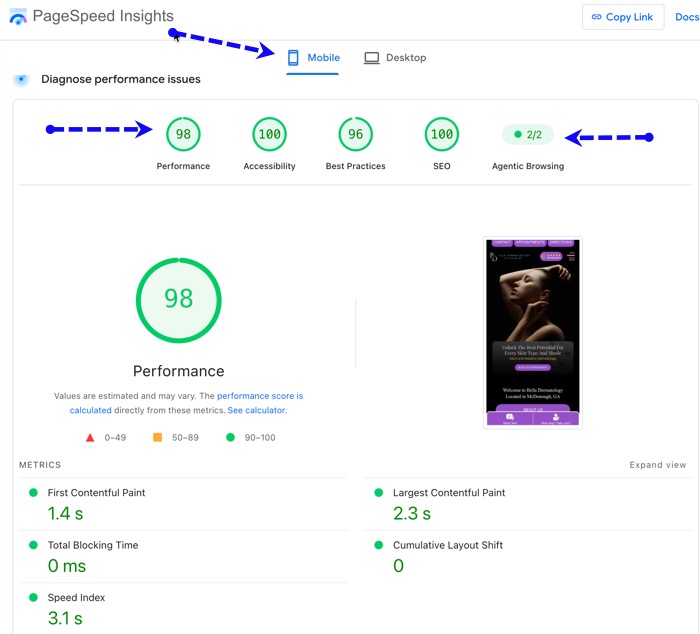
Example of fast loading mobile website of a dermatology practice using PLATINUM service from PatientGain. In this case add 2.3 + 3.1 – which is = 5.4 seconds. Then divide by 2 = 2.7 seconds. This is the real user experience captured by Google’s PageSpeed test in the last 30 days – Anyone can can check the speed of any website. Important note – make sure you check the “Mobile” tab.
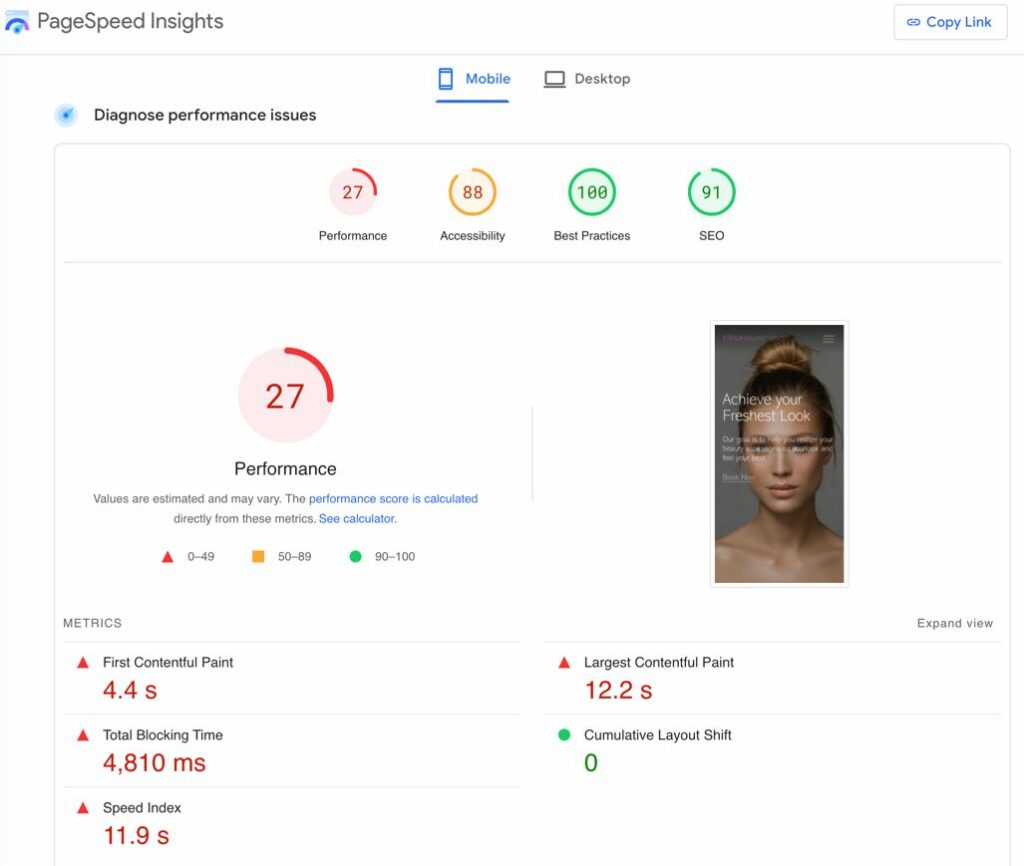
Example of slow loading mobile website of a dermatology practice NOT using PLATINUM service from PatientGain. In this case add 12.2 + 11.9 – which is = 24.1 seconds. Then divide by 2 = 12.1 seconds. This is the real user experience captured by Google’s PageSpeed test in the last 30 days – Anyone can can check the speed of any website. Important note – make sure you check the “Mobile” tab.
 Send Text
 How may I help you?