

If my Email company provides HIPAA Compliant Email server, does this mean that patients can send me PHI and be HIPAA compliant?
Common question:
Is this correct that Emails when travel through different “servers” are not HIPAA compliant, even though you may have a Email service that collects Emails in a HIPAA compliant server?
Answer: Yes, this is generally correct, and it highlights a major loophole in email security: a “HIPAA-compliant server” only guarantees that your data is safe while it sits still (at rest), not when it moves (in transit). When an email leaves your secure host, it hops across multiple intermediate public servers to reach its destination. If those intermediate networks or the recipient’s final server do not support matching security standards, the email drops down to unencrypted “plain text,” making it a severe HIPAA transmission security violation.
Why Intermediate Servers Break HIPAA Compliance
- Opportunistic Encryption Fails: Standard email relies on Transport Layer Security (TLS). If you send an email from a secure host (like Google Workspace with a signed BAA) to a patient or third-party using an older or insecure email server, the connection defaults back to plaintext. Anyone managing or hacking those intermediate routing servers can read the message body and attachments.
- The BAA Limitation: The Business Associate Agreement (BAA) you sign with your secure email host only covers their data centers. It does not cover the third-party routers, internet service providers, or destination servers handling the message along the way.
The Difference: At-Rest vs. In-Transit Security
To understand why a secure server isn’t enough, you must separate how HIPAA evaluates data storage versus data movement:
| Security Type | What it Protects | Does a Secure Server Provider Cover This? |
|---|---|---|
| Data At-Rest | Databases, stored inboxes, and cloud backups. | Yes. Covered by the BAA and server encryption. |
| Data In-Transit | The email as it moves across various intermediate public servers. | No. They cannot control the external servers the email hops through. |
How to Achieve True HIPAA Compliance
To fix this vulnerability, you must ensure that intermediate servers cannot read the content even if they intercept it.
- Enforced TLS: Configure your email client to reject delivery entirely if a secure TLS 1.2 or 1.3 connection cannot be established with the recipient’s server. This prevents the email from falling back to insecure plaintext.
- Message-Level/End-to-End Encryption: Use tools (like S/MIME, PGP, or specialized HIPAA email plugins) that encrypt the actual content of the message before it leaves your device. The intermediate servers only see scrambled gibberish.
- Secure Patient Portals: Avoid sending Protected Health Information (PHI) directly through email. Instead, send an email notification that prompts the recipient to log into a secure, password-protected portal to read the message
Complete Alternate Turn Key Solution: If I use SPOC app from PatientGain, are the messages HIPAA Compliant ?
Yes, messages sent and managed directly within the PatientGain SPOC (Single Point of Conversion) app are HIPAA-compliant, but there is an important caveat depending on how the communication reaches the patient.
PatientGain designs the SPOC app specifically as a unified healthcare inbox that meets HIPAA requirements. However, applying the rule from our previous discussion about data “in transit,” the final compliance of a message relies heavily on the channel being used.
Where the SPOC App is Fully Compliant
When you and your staff use the app’s internal dashboard, your data is secure:
- The Business Associate Agreement (BAA): PatientGain signs a standard BAA with your practice, legally binding them to protect electronic Protected Health Information (ePHI).
- Secure Environment: Data is encrypted at rest and in transit using HTTPS/SSL while hosted on secure Amazon Web Services (AWS) cloud infrastructure.
- Internal Safeguards: The dashboard features strict user access controls, detailed audit trails, and daily security log reviews.
The Caveat: Standard SMS/Texting vs. Secure Portals
The SPOC app consolidates several incoming channels (website forms, chatbots, and text messages). If you use the app to reply to a patient, compliance depends on how that message travels:
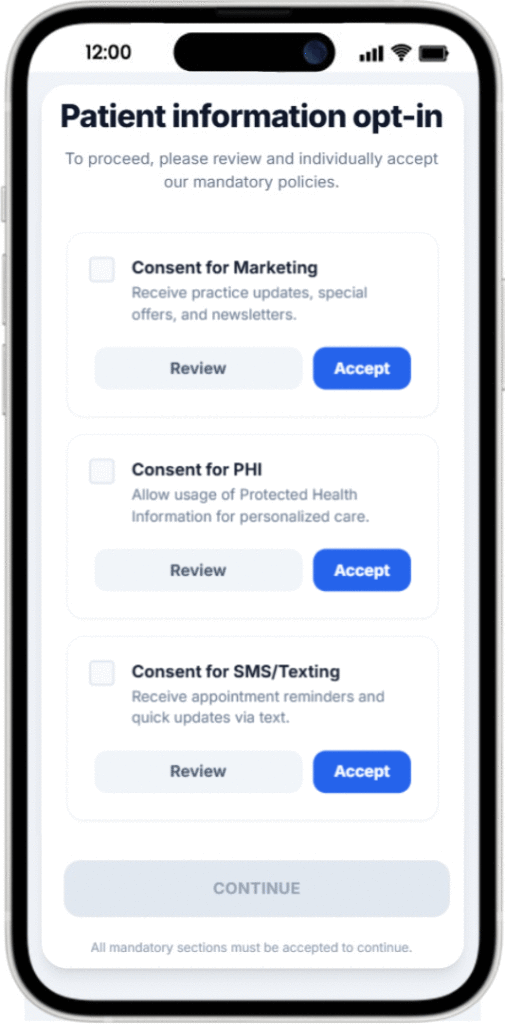
- Standard 2-Way SMS (Texting): If you use the SPOC app to text a patient’s mobile phone directly via standard SMS, the message leaves PatientGain’s secure environment and travels over public cellular networks. Standard SMS does not support end-to-end encryption. To remain HIPAA-compliant here, The SPOC app in conjunction with QuickSend App, first gets consent from the patient about sending them PHI over non-secure SMS/Text and Email. If the patient accepts the consent, then the app logs the consent in the Consent Management App. And then allows your staff to continue. If the patient does not consent, then you have the ability to send secure messages using Secure Messaging.
- Secure Messaging Client/Portal: If the patient initiates communication through a secure, encrypted portal or a verified secure messaging option hosted by PatientGain, the conversation stays fully encrypted on both ends and is completely HIPAA-compliant.
- However, the practice must comply with PatientGain’s security policy and BAA.
How to Stay Safe Using SPOC
- Ensure your practice has a signed BAA on file with PatientGain before handling patient data.
- Use PatientGain’s built-in patient consent management tools to document that patients agree to receive text or email notifications.
- Train front-desk staff to keep standard SMS replies strictly focused on logistics (e.g., “Your appointment is confirmed”) rather than sharing detailed medical or billing records.
 Send Text
 How may I help you?