

HIPAA-Compliant Website Lead Capture
Practice managers ask: How can I make sure that our healthcare practice website captures leads per HIPAA guidelines and only certain staff from my clinic has an access?
To capture website leads safely under HIPAA guidelines and restrict who can view that data, your practice must treat the lead capture mechanism as a secure part of your electronic protected health information (ePHI) workflow.
Step 1: Sign a Business Associate Agreement (BAA)
- The Rule: Standard website builders (like native WordPress, Squarespace, or Webflow forms) and general form tools (like Google Forms or Typeform) are not HIPAA-compliant out of the box and typically will not sign a Business Associate Agreement (BAA).
- The Action: Use a dedicated, HIPAA-compliant form or lead-capture vendor (such as Jotform, PatientGain) that explicitly offers and signs a BAA. The BAA legally binds the vendor to protect the data alongside your practice.
Step 2: Minimize What You Collect
- The Rule: Apply the HIPAA Minimum Necessary Standard.
- The Action: Keep public lead-capture or contact forms simple—ask only for a name, phone number, email address, and general preferred contact method. Avoid open-ended text boxes asking for specific symptoms, medical history, or diagnoses on standard marketing pages. If clinical details are required, route patients to a password-protected patient portal instead.
Step 3: Enforce End-to-End Encryption
- The Rule: ePHI must be protected both in transit (as the user types and submits it across the internet) and at rest (while stored on servers).
- The Action: Ensure your website uses active TLS/SSL encryption (
https://), and verify that your form vendor uses strong encryption standards (such as AES 256-bit for stored submissions).
Step 4: Restrict Access with Role-Based Access Controls (RBAC)
- The Rule: Under the HIPAA Security Rule, only authorized personnel with a legitimate “need to know” job function should access patient inquiries or lead data.
- The Action:
- Configure your form dashboard or integrated CRM (like HubSpot or Salesforce configured for HIPAA) with Role-Based Access Controls (RBAC).
- Grant login credentials only to designated intake coordinators, practice managers, or front-desk staff who handle scheduling.
- Enforce unique user logins (no shared generic “frontdesk@” passwords), multi-factor authentication (MFA), and automatic session timeouts (e.g., logging users out after 15 minutes of inactivity).
Step 5: Notifications and Eliminate Tracking Leaks
- The Rule: Standard email is rarely HIPAA-compliant, and website marketing trackers (like Meta/Facebook Pixels or Google Analytics) can accidentally siphon PHI to third-party ad networks if installed improperly.
- The Action:
- Configure form notification emails to not include sensitive health details; instead, have the email simply alert staff to log into the secure dashboard.
- Audit and scrub tracking pixels or analytics tags from pages that touch intake or health data to prevent accidental violations.
How does PatientGain SPOC app and service handles this?
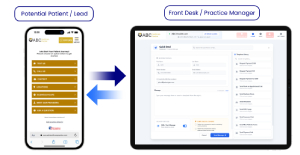
The PatientGain SPOC (Single Point of Conversion / Single Point of Contact) App and Service addresses these specific HIPAA and access-control challenges by operating as a fully regulated “walled garden” medical marketing platform. Rather than patching together loose contact forms and generic CRMs, the SPOC app funnels all website inquiries, text messages, chatbots, and tracking phone calls into one centralized, secure dashboard. The platform handles secure lead capture and staff access restriction through several specific mechanisms:
1. Contractual Accountability: A Signed BAA
PatientGain issues a standard Business Associate Agreement (BAA) covering the SPOC app, its secure data storage pipelines, and analytics tools. This contractually binds them to protect patient electronic Protected Health Information (ePHI).
2. Multi-Layered Access Controls (RBAC)
To address the need to restrict lead access to specific staff members, PatientGain uses strict administrative and technical guardrails:
- Role-Based Access Controls (RBAC): Your practice users are split into segregated tiers and roles based on job function. Practice managers can grant access exclusively to designated intake or front-desk personnel.
- No Shared Logins: PatientGain prohibits the use of generic shared email accounts (like “frontdesk@clinic.com”). Each authorized employee must use a unique user login backed by Multi-Factor Authentication (MFA) and automated session timeouts to prevent unauthorized physical access at the clinic.
- Need-to-Know Obfuscation: The platform utilizes an advanced data masking and obfuscation layer. This means that even among authorized front-desk staff, highly sensitive information is obscured or restricted on a need-to-know basis. Even PatientGain’s own internal support staff are background-checked and restricted from viewing your lead data unless required.
3. Data Protection In Transit and At Rest
Patient Gain completely bypasses standard website backend storage. When a lead is captured on your site via a SPOC form or chatbot, the data is encrypted using SSL/TLS protocols during transmission. It is then transferred directly onto secure, HIPAA-compliant cloud architecture (AWS and Google Cloud Platform) where the data remains encrypted at rest.
4. Continuous Audit Trails
To guarantee accountability, the SPOC service logs all application-level access. Comprehensive audit logs record precisely who viewed, handled, or un-obfuscated a lead’s information and when. Practice managers can review these communication logs at any time.
5. Tracking and Consent Safeguards
- Smarter Notifications: Instead of emailing a lead’s medical inquiries to your staff over unencrypted networks, the system flags the interaction and prompts the staff to handle communications securely inside the dashboard (which is built to mimic a standard email layout like Gmail or Outlook for easy adoption).
- Integrated Patient Consent: The system features a built-in Consent Management App that logs and documents informed patient consent for communications like text messaging right at the point of capture.
- Replacing Non-Compliant Ad Trackers: If you use PatientGain’s higher-tier services, they utilize a native tracking engine (SPoSA) that sanitizes and strips PHI before data flows to marketing analytics, ensuring tracking pixels don’t accidentally leak data to companies like Meta or Google.

 Send Text
 How may I help you?