

Building a DIY Urgent Care Website
I have a single urgent care and primary care practice. I have been approached by a local SEO company that says they can do a better job than PatientGain’s GOLD service at $500/mon, rather than paying $799 per month? Is this realistic and what are the possible issues ?
For an urgent care and primary care practice, an offer of $500/month from a local SEO company to replace a managed medical platform is highly unrealistic and carries substantial operational risk.
While a local agency may genuinely mean well and understand standard search algorithms, they are likely selling you generic organic SEO (keyword optimization and basic link building) while overlooking the complex tech stack required to run a modern, compliant healthcare practice.
Why the $500/Month Proposal is Structurally Unrealistic
An urgent care and primary care facility relies on immediate patient action, not just reading articles. A general SEO agency focuses on driving traffic to a website, but they do not build the tools that turn that traffic into scheduled patients.
If you switch to a general $500/month SEO provider, you will likely lose the following integrated features included in the PatientGain GOLD Service (which starts at $899/month):
- No Integrated Software: General SEO companies do not provide software. You will have to pay separate software licensing fees for a HIPAA-compliant CRM, text messaging platforms, intake forms, and scheduling software.
- The “Hidden” Setup Cost: PatientGain waives website development costs via their contract. A local SEO company will either charge you a $3,000 to $5,000+ upfront fee to build a medical website, or they will perform SEO on your existing website without fixing its conversion layout.
- Hidden HIPAA issues – Common one – Using free Google Analytics is a problem, unless you have proxy server to mask the PHI Events and store them per HIPAA. The cost of this alone with BAA will be about $200/mon – atleast.
- The Software Fragment Fee: To match the functionality of a dedicated medical platform, you would have to piece together a fragmented tech stack:
- HIPAA-Compliant Web Forms: ~$79–$99/month
- 2-Way Patient Texting/Chat: ~$199/month
- Email Marketing Engine: ~$299/month
- Total Hidden Software Cost: +$570+/month on top of your $500 SEO fee.
The Crucial Differences for Urgent Care & Primary Care
| Feature / Need | PatientGain GOLD Service ($899/mo) | Local SEO Company ($500/mo) |
|---|---|---|
| HIPAA Compliance & BAA | Included. Signs a Business Associate Agreement (BAA) protecting patient data. | Rarely Included. General agencies lack the legal infrastructure or server environments to sign a BAA. |
| Urgent Care “Near Me” Optimization | Built-in. Uses structured local maps architecture designed to capture high-intent “Open Now” or “Urgent Care near me” walk-ins. | Generic. Focuses on traditional keyword blog posts (e.g., “5 Symptoms of the Flu”), which takes months to rank. |
| Patient Acquisition Apps | 10+ Native Apps (Scheduling, Chatbots, Lead Funnels, Review Gatherers) mapped directly to your dashboard. | 0 Apps. They optimize text content but do not build or provide interactive software tools. If any apps are added they are either free ones (lack BAA) or will cost extra. |
| Patient Review Systems | Automated. HIPAA-compliant SMS and email prompts to acquire Google/Yelp reviews. | Manual. They may give you advice on how to ask for reviews, but they won’t provide the software infrastructure to do it automatically. |
Possible Issues and Risks of Switching
- Severe Security & Compliance Liabilities:
If the local SEO company installs standard, cheap marketing trackers (like standard Google Analytics or Meta Pixels) on your patient scheduling or contact forms, you risk severe HIPAA violations and massive federal fines. Standard agencies are rarely trained on HHS guidelines regarding tracking technologies. - Broken Patient Funnels:
A local agency might succeed in bringing 500 new visitors to your website, but if the site lacks an intuitive, functional online scheduling button, a live chatbot, or digital intake forms, those visitors will bounce back to Google and book with a competitor. - Primary Care vs. Urgent Care Keyword Mismatch:
Urgent care requires high-velocity local map optimization (Google Business Profile). Primary care requires authority building (“Doctor accepting new patients”). Standard agencies often use a single, slow template for both, failing to capture immediate-need walk-ins. - “Finger-Pointing” Technical Support:
If your website crashes or your appointment form stops working, a local SEO agency will often blame your hosting provider or your EMR system. With a unified medical platform, a single engineering support desk is entirely responsible for fixing the entire system.
The Bottom Line
The local agency is offering a lower price because they are only offering one slice of the pie (basic text and keyword optimization). By the time you purchase the external software, security tools, and conversion widgets required to run a real clinic, your total monthly cost will easily exceed $1,000–$1,200/month, while introducing significant data privacy liabilities.
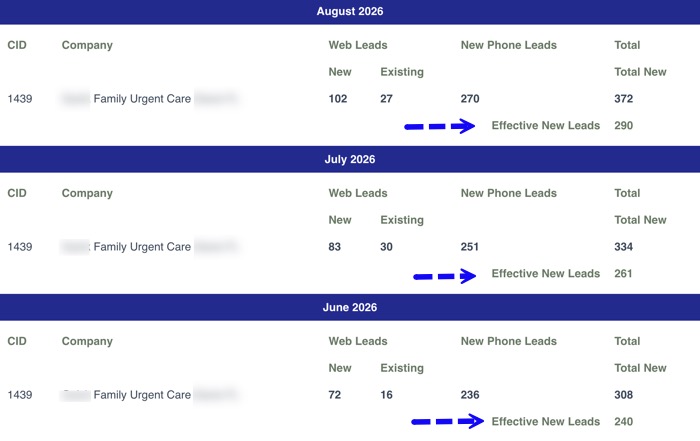
Example of a marketing dashboard of a single location Urgent Care. Using GOLD service. In the month of August, there are 372 total new leads, after subtracting duplicate and sales calls, there are 290 effective new leads. NOTE: Existing patient inquiries are not included in 290 effective new leads.
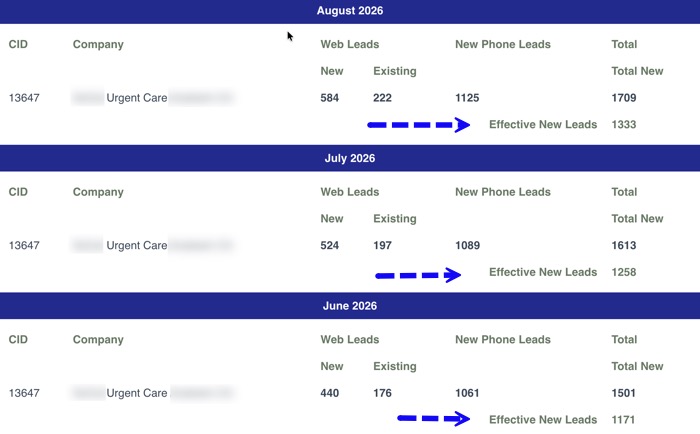
Example of a marketing dashboard of a single location Urgent Care. Using PLATINUM service. In the month of August, there are 1709 total new leads, after subtracting duplicate and sales calls, there are 1333 effective new leads. NOTE: Existing patient inquiries are not included in 1333 effective new leads.
10 things that are often overlooked for healthcare practice HIPAA compliant website
Third-Party Tracking Pixels and Analytics: Marketing tags (like Meta Pixel or Google Analytics) can capture visitor IP addresses alongside page views (e.g., /treatments/oncology) and transmit health-seeking intent to third parties without a signed Business Associate Agreement (BAA).
Lack of signed BAA (Business Associate Agreements) with every service provider. This typically includes: SEO firms, PPC firms, Email marketing firms.
Contact & Appointment Forms Transmitting Plain text Email: Standard website forms often route patient entries directly to standard, unencrypted email inboxes. Form data containing ePHI must be encrypted in transit and at rest, ideally stored within a secure, BAA-backed portal.
Web Hosting Without a Signed BAA: Standard shared web hosts (e.g., basic GoDaddy or Bluehost plans) do not sign BAAs or provide the required administrative and physical safeguards to process or store ePHI on their servers.
Unsecured Live Chat & AI Widgets: Embedded customer service widgets often capture patient names, contact details, and symptoms, storing chat transcripts on third-party servers that lack HIPAA-grade encryption or signed BAAs.
Patient Testimonials and Photos Without Specific Authorization: Publishing patient reviews, success stories, or before/after photos requires a separate, legally binding HIPAA Authorization Form. Standard clinical treatment consent forms do not cover public website publishing.
Unencrypted Website Backups: Automated CMS backups stored in basic cloud storage accounts (e.g., personal Dropbox or Google Drive) expose database files containing stored form submissions and user data.
Lack of Multi-Factor Authentication (MFA) on CMS Logins: Admin dashboards (e.g., WordPress /wp-admin) left protected by single passwords allow unauthorized personnel access to site databases and form submission logs.
Web Server Logs Capturing IP Addresses: Default server logging captures IP addresses paired with specific URLs visited. Under HHS guidance, an IP address linked to a health query or treatment page can constitute ePHI.
Embedded Third-Party Scheduling Tools: Integrating calendar software that sends appointment confirmation details—including treatment reasons—via unencrypted SMS or standard email to the patient.
Incomplete TLS/SSL Configurations: Relying solely on a basic SSL certificate without enforcing HTTPS across all subdomains, media uploads, and assets, or failing to disable outdated protocols (like TLS 1.0 and 1.1).
Examine these entities – they will typically require a signed Business Associate Agreement (BAA) depends on whether they have direct or potential access to Electronic Protected Health Information (ePHI). Under HIPAA, a patient’s name, email address, IP address, or phone number becomes ePHI the moment it is linked to a healthcare provider or specific medical condition.
1. Web Developer
- BAA Required? YES.
- Why: Web developers almost always have backend administrative access to your CMS (e.g., WordPress), database, hosting environment, or form log plugins. Even if they aren’t actively looking at patient data, having technical access to contact forms, appointment requests, or site backups containing form submissions legally classifies them as a Business Associate.
- Exception: If they write code purely in an offline/local development environment with zero access to your live server, hosting account, or database.
2. Email Marketing Company
- BAA Required? YES.
- Why: Uploading a patient contact list to an email platform creates ePHI because email addresses are tied to your practice. The platform that stores, encrypts, and transmits these emails must execute a BAA.
- Important Catch: Popular platforms like standard Mailchimp, Klaviyo, or MailerLite will not sign a BAA on basic plans. You must use a specialized, HIPAA-compliant email service (or enterprise tier) that explicitly signs a BAA.
3. SEO Company
- BAA Required? DEPENDS (Usually Yes).
- Why:
- YES if: They have logins to your website CMS, access to lead forms, access to call-tracking software, or access to server-side analytics containing visitor IP addresses and health search URLs.
- NO if: They only perform keyword research, write blog posts in separate Google Docs, and execute off-site backlink strategies without any login access to your website, CRM, or lead logs.
4. PPC (Pay-Per-Click) Ad Agency
- BAA Required? DEPENDS (Agency: Usually Yes).
- Why:
- The PPC Agency: YES, if they manage landing pages that collect patient leads, listen to call-tracking recordings, or log into your CRM/lead dashboard.
- The Ad Platforms (Google Ads, Meta Ads): THEY WILL NOT SIGN A BAA. Because Google and Meta refuse to sign BAAs for their advertising products, your PPC agency must configure tracking pixels and ads so that zero ePHI (no IP addresses on health pages, no lead form details) is passed to Google or Meta.
5. Social Media Posting Firm
- BAA Required? Yes – If handling DMs or Patient Media
- Why:
- NO if: They only design, write, and schedule general promotional or educational posts directly to public platforms (Facebook, Instagram, LinkedIn) without touching patient data.
- YES if: They manage your social media inbox and handle Direct Messages (DMs) where patients ask medical questions or request appointments, OR if they handle/upload patient testimonials and before-and-after photos. (Note: Patient photos also require a signed HIPAA Authorization Form from the patient).
Summary Checklist
| Vendor | BAA Needed? | Primary Risk Area |
| Web Developer | Yes | Database/Form submission access |
| Email Marketing Service | Yes | Storing patient email lists & sending ePHI |
| SEO Company | Likely Yes | CMS logins, analytics, and lead access |
| PPC Agency | Likely Yes | Landing page forms, lead logs, pixel setup |
| Social Media Firm | Likely Yes | Inbox DMs and patient photo handling |
 Send Text
 How may I help you?