

Why Patient Privacy Apps are Required for a Healthcare Provider Website?
Until a few years ago, medical and dental practices generally treated their websites like any other small business website. However, the regulatory landscape has drastically shifted. Today, utilizing Patient Privacy Apps (often referred to as Consent Management Platforms or CMPs) is no longer just a “best practice”—it is a strict legal requirement to avoid massive federal fines, class-action lawsuits, and data breaches.
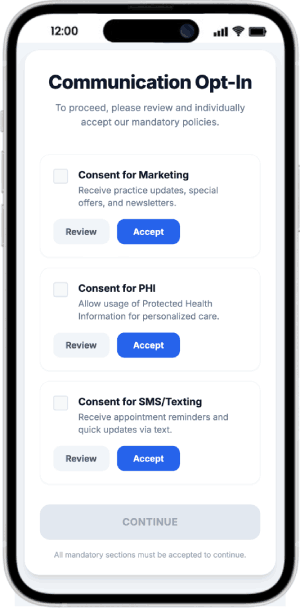
Why can’t healthcare providers just use cookie acceptance apps?
It is incredibly common for practice owners to think, “Every other website has a simple ‘Accept Cookies’ pop-up, why can’t I just use one of those?” The short and urgent answer is no. You cannot rely on a standard cookie acceptance app for a healthcare website. Relying on a standard WordPress cookie plugin or any other website cookie acceptance or a basic banner app (like the ones used by e-commerce stores) is one of the most dangerous compliance mistakes a medical practice or a dental practice can make today. Here is the legal and technical reality of why those apps fail in healthcare.
1. “Accepting Cookies” is NOT a HIPAA Authorization
Standard cookie banners were built to comply with European laws (GDPR) or general consumer laws (like the CCPA). They were not built for HIPAA.
- The Law: Under HIPAA, the combination of an IP address and a visit to a health-related webpage (like “sciatica treatments”) is considered Protected Health Information (PHI). Even standard tracking technologies (Like Google tag manager, analytics) are no longer HIPAA compliant.
- The Failure: To legally share PHI with a third-party marketing company (like Facebook or Google) without a Business Associate Agreement (BAA), HIPAA requires a highly specific, signed specific HIPAA Authorization. It can be digitally signed or in person on a piece of paper. And you are required to keep records for up to 6 years.
- Clicking a button that says “We use cookies to improve your experience, click Accept” does not meet the legal threshold of a HIPAA Authorization. It lacks the required legal language, expiration dates, and revocation rights. If you send data to Meta based purely on a cookie click, you are violating HIPAA.
2. The “Dummy Banner” Technical Flaw
Many cheap or free cookie acceptance apps are essentially “dummy banners.”
- The Failure: They display a pop-up warning the user about cookies, but if you look at the background code, the Meta Pixel and Google Analytics trackers have already fired the millisecond the webpage loaded—before the patient even had a chance to read the banner or click “Accept.”
- The Consequence: In healthcare, the moment that pixel fires and captures the IP address on a medical page, the HIPAA violation has already occurred. A true healthcare privacy app physically blocks all scripts from loading until legal compliance is met.
3. The Third-Party BAA Problem
Even if you had the best standard cookie banner in the world, it doesn’t solve the core issue of where the data is going.
- Standard tracking tools (like standard Google Analytics 4, the Meta Pixel, or TikTok Pixel) are fundamentally not HIPAA compliant. Google and Meta will not sign a Business Associate Agreement (BAA) for these specific tracking tools.
- Because they won’t sign a BAA, you cannot send them PHI. A cookie banner doesn’t change the fact that the destination for the data is illegal for healthcare providers to use in its raw form.
What You Must Use Instead
Instead of a basic cookie banner, healthcare websites must use a Healthcare-Specific Consent Management Platform (CMP) paired with Server-Side Tracking.
- Healthcare CMPs: Tools like Freshpaint, MedStack, or PatientGain’s built-in privacy apps are designed specifically for medical legalities. They don’t just ask for cookies; they manage the flow of PHI.
- Server-Side Tracking: Instead of letting a tracking pixel sit on the patient’s browser (where it illegally steals their IP address), advanced healthcare platforms route the website data to a secure, HIPAA-compliant server first. That server strips out the patient’s IP address and identity, and then sends an anonymized signal to Google or Facebook saying, “A conversion happened,” without telling them who the patient was.
The Requirement
1. The HHS OCR Crackdown on “Tracking Pixels”
The single biggest reason privacy apps are required today stems from aggressive guidance updates by the U.S. Department of Health and Human Services (HHS) Office for Civil Rights (OCR) regarding online tracking technologies.
- The Problem: Most websites run background tracking scripts (like Google Analytics or the Meta/Facebook Pixel) to see how many people visit their site. However, the OCR ruled that if a patient visits a specific medical page on your site (e.g., “Oncology Second Opinions” or “Diabetes Treatment”) and that pixel captures their IP address and sends it to a tech company, it constitutes an unauthorized disclosure of Protected Health Information (PHI).
- The Law: You cannot share this data with third-party advertising or analytics vendors without a signed Business Associate Agreement (BAA) or explicit, documented HIPAA-compliant authorization from the patient.
- How the App Fixes It: A standard, generic “cookie banner” does nothing to stop these trackers from firing in the background. A true Patient Privacy App acts as a firewall, physically blocking all analytics and advertising pixels from loading until the patient explicitly and legally opts in.
2. The Rise of “Pixel Litigation” and State Privacy Laws
Even if a visitor to your website is not yet an official patient (meaning HIPAA might not strictly apply to them yet), aggressive new state laws have stepped in to protect their browsing data.
- The Threat: By 2026, a patchwork of state laws—most notably Washington’s My Health, My Data Act (MHMD) and California’s CCPA/CPRA—categorize health-related web browsing as highly sensitive consumer data. Washington’s law is particularly dangerous because it includes a “Private Right of Action.” This means plaintiff attorneys are actively using bots to scan healthcare websites; if they catch your site tracking health data without consent, they can sue you directly without waiting for a government agency to fine you.
- How the App Fixes It: Advanced privacy apps use geolocation to detect where the user is browsing from. It will dynamically present the exact consent language required by the user’s specific state, protecting you across state lines.
3. Mandatory Audit Trails for Compliance
If your practice is ever investigated by the OCR or state regulators, simply saying “we asked for their permission” is not a valid legal defense. You must be able to prove it with hard data.
- The Requirement: Federal and state regulations generally require you to maintain secure, unaltered logs of patient consent (often for a minimum of 6 years).
- How the App Fixes It: Privacy apps automatically generate a tamper-proof audit trail. When a patient clicks “I Consent” on your site, the app logs the exact timestamp, the user’s IP address, and the specific categories of data tracking they agreed to. This log is your primary shield during an audit.
4. Preventing “HIPAA Leakage” Through Web Forms
A healthcare website is often a Frankenstein-like combination of different plugins: a calendar widget here, a contact form there, and a chat box in the corner.
- The Problem: If a patient types their symptoms into a standard, unencrypted WordPress contact form, and that form sends an unencrypted email to your front desk, you have committed a HIPAA violation. Data is “leaking” across unsecured channels.
- How the App Fixes It: Privacy apps ensure that any data entered on the website is intercepted, encrypted, and securely routed. Instead of sending an unsecured email, the app acts as a secure bridge, funneling the patient’s inquiry directly into a HIPAA-compliant CRM or dashboard covered by a BAA.
So how does PatientGain.com’s Patient Privacy app addresses this issue?
PatientGain.com’s Patient Privacy App is specifically designed to address the critical need for protecting patient data and ensuring compliance with privacy regulations like HIPAA (Health Insurance Portability and Accountability Act) and other healthcare-related privacy laws. The app is focused on safeguarding Protected Health Information (PHI) and ensuring that healthcare providers handle this sensitive information securely and in compliance with the necessary regulations.
1. HIPAA Compliance and Secure Data Handling
PatientGain’s Patient Privacy App ensures that all patient data, including sensitive health information (PHI), is handled in compliance with HIPAA regulations. It uses robust security measures to protect patient data and keep it confidential at all times. Key features include:
- End-to-End Encryption: All patient data transmitted between the app, website, and healthcare providers is encrypted to prevent unauthorized access during transmission.
- Secure Storage: Patient data is stored in HIPAA-compliant servers, ensuring that sensitive health information is stored safely and can only be accessed by authorized users.
- Access Control: The app allows for role-based access to ensure that only authorized staff can access specific patient data. For example, a receptionist might only see basic contact information, while a doctor can access complete medical histories.
Benefit: This ensures that all patient data is protected, and the healthcare provider meets the strict HIPAA requirements for data security and confidentiality.
2. Patient Consent Management
PatientGain’s app provides healthcare providers with the tools to easily manage patient consent for collecting and sharing personal and health information. The app helps practices ensure that they have explicit consent from patients, which is required under both HIPAA.
- Digital Consent Forms: The app allows practices to send electronic consent forms to patients for digital signature. Patients can review and sign forms remotely, streamlining the process and making it easier for the practice to document consent.
- Granular Consent Options: Patients can be given specific options about what data they are willing to share, with whom, and for what purpose, ensuring full transparency and control over their health information.
- Audit Trails: All patient consent actions are logged within the app, creating an audit trail that tracks when and how consent was obtained. This is crucial for ensuring compliance with privacy laws and for providing documentation in case of an audit or investigation.
Benefit: Ensures that patient consent is documented, transparent, and in line with HIPAA and other data privacy regulations, reducing the risk of compliance issues.
on, reducing the risk of data breaches or leaks.
3. Audit Trails and Data Tracking
One of the key features of PatientGain’s Patient Privacy App is its ability to create and maintain audit trails for all patient interactions. This is crucial for meeting HIPAA’s record-keeping requirements.
- Tracking Access: The app records who accessed patient data, when, and for what purpose, providing a clear log of all data-related actions. This makes it easier to investigate potential security incidents or track access during audits.
- Compliance Monitoring: The app also helps healthcare providers ensure that all privacy policies and practices are being followed. It provides continuous tracking of all activities related to PHI, ensuring compliance with privacy laws at all times.
Benefit: Real-time tracking and auditable logs ensure complete transparency regarding who has access to patient data and what actions were taken, helping the clinic stay compliant with HIPAA and avoid penalties.
5. Privacy and Security for Online Forms and Data Collection
PatientGain’s Patient Privacy App allows for the secure collection of patient data.
- Encrypted Online Forms: When patients submit their medical history or insurance information online, the app ensures the data is encrypted and transmitted securely to avoid unauthorized access.
- No Data Leaks: The app prevents potential data leaks by ensuring that no sensitive patient information is shared outside the secure platform without explicit consent.
Benefit: Secure data collection and no data leaks help ensure that all patient information is protected and compliant with HIPAA regulations.
6. Privacy Opt-Out Management
PatientGain’s app also includes privacy opt-out management, allowing patients to manage their preferences regarding data sharing or communications.
- Opt-Out of Marketing Communications: Patients can choose to opt out of marketing emails or third-party data sharing, ensuring that your practice only shares information that the patient is comfortable with.
- Patient Privacy Dashboard: A dedicated dashboard allows patients to easily view and control their privacy settings, giving them transparency and control over their data.
Benefit: Ensures that patients have full control over their data, which fosters trust and ensures compliance with privacy regulations.
Conclusion: How PatientGain’s Patient Privacy App Addresses Privacy Issues
PatientGain’s Patient Privacy App provides a comprehensive solution for protecting patient health information while ensuring compliance with HIPAA and other privacy regulations. It offers secure data storage, automated consent management, encrypted communication, and audit trail functionality, all of which ensure that patient data is handled with the highest level of security and transparency. By integrating these features into your healthcare website, PatientGain helps your practice maintain patient trust, comply with regulations, and protect sensitive health data from unauthorized access or breaches. This is crucial in today’s digital healthcare landscape, where the security of patient data is paramount for both legal compliance and patient satisfaction.
 Send Text
 How may I help you?