

How to Use AI in Your Medical Clinic Without Upsetting Patients
Common question asked by healthcare practice managers and healthcare practice owners: I have started using the AI apps on my practice website – however my patients are getting upset – They still want to talk to a human being, front desk – They are not using the AI apps on my website?
How to Use AI in Your Medical Clinic: Table Of Contents
Common Question: Patients Are Upset With AI Apps on My Medical Practice Website. What Should I Do?
Common Question: Patients Are Upset With AI Apps on My Medical Practice Website. What Should I Do?
This is a common issue for medical clinics. Many practices add AI chatbots, AI scheduling tools, AI phone assistants, or AI intake apps expecting patients to use them, but patients still prefer the front desk, phone calls, and human reassurance. The problem is usually not that patients hate AI. The problem is that the AI is being used as a replacement for human service instead of a support tool for better service. The AMA says AI in healthcare should be used in a responsible, ethical, and transparent way, and that its use should be transparent to both physicians and patients.
Why Patients May Be Getting Upset
| Reason | What Patients Feel |
|---|---|
| They feel blocked from a human | “I just want to talk to someone.” |
| The AI gives generic answers | “This does not understand my situation.” |
| They have symptoms or anxiety | “I need reassurance, not a bot.” |
| They have insurance or billing questions | “This is too specific for AI.” |
| The chatbot asks too many questions | “This is wasting my time.” |
| They do not trust AI with health information | “Where is my data going?” |
| There is no easy human handoff | “I am stuck in automation.” |
The Best Solution: AI + Human Front Desk
Your clinic should not remove AI completely. Instead, use AI to support the front desk, not replace it.
A better model is: AI handles simple tasks. Humans handle emotional, clinical, billing, urgent, and complex issues.
| AI Should Handle | Human Staff Should Handle |
|---|---|
| Hours, address, directions | Symptoms and medical concerns |
| Basic service questions | Insurance confusion |
| Appointment reminders | Billing disputes |
| Simple scheduling requests | Angry or anxious patients |
| Intake form links | Medication questions |
| Review requests | Lab results or clinical follow-up |
| Missed-call text-back | Patients who ask for a person |
What to Change on Your Website
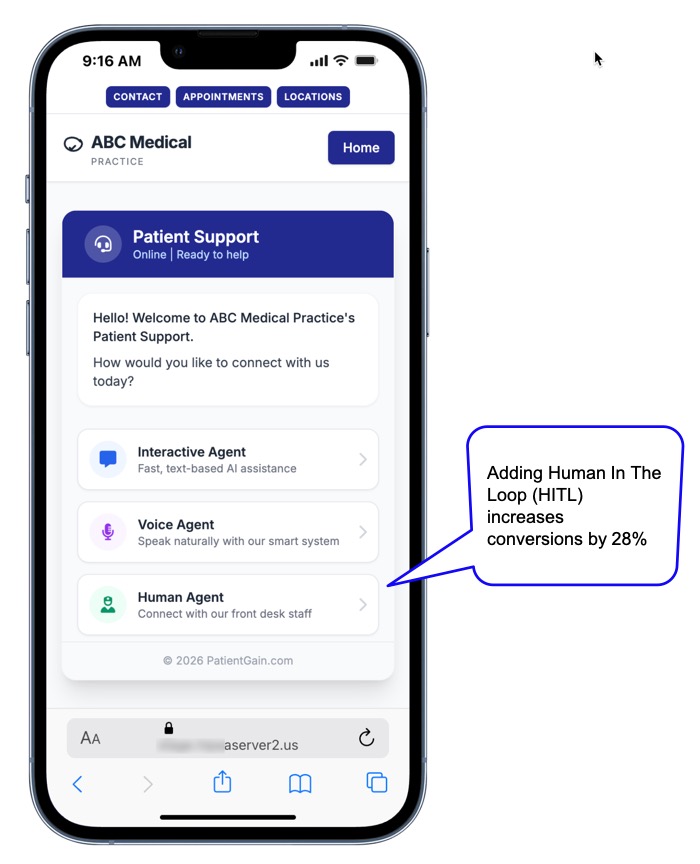
Instead of forcing patients into AI, give them clear choices:
Call Our Front Desk
Request a Callback
Text Our Team
Book Online
Ask Our Virtual Assistant (AI)
This makes AI optional instead of frustrating.
A good message would be:
“Need help fast? You can call our front desk, request a callback, or use our virtual assistant for simple questions like hours, directions, services, and appointment requests.”
Add a Human Escape Button
Every AI tool should include a clear option such as:
“I want to speak with a person.”
or
“Have the front desk call me.”
This is one of the most important fixes. Patients are less likely to get upset when they know a real person is still available.
Use AI Behind the Scenes
Many patients do not need to interact directly with AI. Your clinic can still use AI internally to improve service.
For example, AI can help your staff:
- Summarize patient inquiries
- Send missed-call text-backs
- Draft replies for staff approval
- Sort messages by urgency
- Remind patients about appointments
- Send follow-up instructions
- Track unanswered leads
- Identify common questions
This gives your clinic the benefits of AI without making patients feel replaced by AI.
Be Careful With HIPAA and Patient Privacy
AI apps, chatbots, forms, SMS tools, and tracking technologies can create privacy concerns if they collect or transmit patient information. HHS states that HIPAA rules can apply when regulated healthcare entities use tracking technologies that collect or disclose protected health information.
Before using AI apps, make sure:
- The vendor signs a BAA when required
- Patient data is encrypted
- Chats and forms are stored securely
- AI tools are not using patient data for public model training
- Staff access is controlled
- Tracking pixels are reviewed carefully
- Patients are told how their information is handled
Simple Rule for Medical Clinics
Use this rule:
AI should never be the only door into your clinic.
Patients should always have a clear way to reach a real person.
Better Patient-Friendly AI Workflow
- Patient visits your website.
- Patient sees three clear options: Call, request callback, or use virtual assistant.
- AI answers only simple questions.
- If the patient mentions symptoms, billing, insurance, frustration, urgency, or asks for help, the AI escalates to staff.
- Front desk receives the message and follows up.
- AI tracks the inquiry so no lead is missed.

The 7 Rules for Patient-Friendly AI in a Single-Location Clinic
Rule 1 — Always Identify AI as AI
The fastest way to upset a patient is to have them discover mid-conversation that they were talking to a bot when they thought they were talking to a person. This feels deceptive — because it is.
What to do:
- Your AI chatbot greeting should say something like: “Hi, I’m the virtual assistant for [Clinic Name]. I can answer most questions instantly — or connect you with our team right now.”
- SMS follow-ups triggered by AI should say: “This is an automated message from [Clinic Name]…”
- Review request texts should say: “You’ll receive a brief automated message after your visit…”
What NOT to do:
- Name your chatbot “Sarah” and have it say “Hi, I’m Sarah, how can I help you today?” with no indication it is automated
- Send AI-generated emails from the doctor’s personal email address
- Have the AI say “Let me check on that for you” in a way that implies a human is physically checking
The payoff: Patients who know they are talking to AI and find it helpful are significantly more satisfied than patients who discover they were misled. Transparency earns trust — even when the tool is automated.
Rule 2 — Make the Human Escape Route Obvious and Instant
Every AI interaction must have a visible, one-tap path to a real human. If a patient cannot figure out how to reach a person within 30 seconds of wanting to, frustration sets in immediately.
Practical implementation:
| AI Touchpoint | Human Escalation Option |
|---|---|
| Website chatbot | “Talk to our team” button visible at all times — not buried in a menu |
| After-hours AI response | “We’ll have someone call you first thing in the morning — or call us now at [number]” |
| Automated text reply | “Reply CALL and we’ll phone you back within [X] minutes” |
| AI appointment confirmation | “Questions? Reply to this text or call [number]” |
| Online scheduling | “Prefer to speak with someone? Call [number]” always visible |
The rule of thumb: No patient should ever have to ask more than once to reach a human. If the AI cannot answer the question in two exchanges, it should proactively offer escalation — not wait to be asked.
Rule 3 — Use AI for Speed, Not as a Gatekeeper
The most valuable thing AI does for a single-location clinic is eliminate the dead zones where patients fall through the cracks:
- After-hours inquiries that sit unanswered until morning
- Lunch hour calls that go to voicemail
- Front desk too busy during peak hours to respond to website form submissions
- Appointment confirmations that never get sent because staff forgot
AI covering these dead zones is a genuine service improvement — patients get a response in seconds instead of hours. But AI used to replace human interaction during normal hours — when a patient is trying to discuss a symptom or ask a clinical question — feels like the clinic is cutting corners on their care.
Where AI adds value without frustrating patients:
| Scenario | AI Response | Patient Reaction |
|---|---|---|
| 10 PM form submission | Instant acknowledgment + appointment booking | Grateful — did not have to wait until morning |
| “Do you take Cigna?” | Instant answer | Convenient — saves a phone call |
| “What are your hours on Saturday?” | Instant answer | Useful — exactly what they needed |
| Appointment reminder (24 hrs before) | Automated text reminder | Helpful — reduces no-shows, saves the patient from forgetting |
| Post-visit review request | Automated text 2 hours after appointment | Appropriate timing — experience fresh in mind |
| “I’ve had chest pain for 3 days, should I come in?” | AI should NOT try to answer clinically — immediately route to human or urgent care guidance | Relief — directed appropriately without clinical risk |
Rule 4 — Draw a Hard Line: AI Never Answers Clinical Questions
This is the most important rule for patient safety and practice liability.
AI can answer:
- Hours, location, directions, parking
- Insurance questions (which plans accepted)
- What services the clinic offers
- How to prepare for a specific appointment type
- Prescription refill request routing
- Appointment availability and booking
AI must NOT attempt to answer:
- “Is this symptom serious?”
- “Should I come in or go to the ER?”
- “Can I stop taking this medication?”
- “What does my test result mean?”
- “Is this normal after my procedure?”
When a patient asks a clinical question, the correct AI response is immediate escalation: “That’s a question for one of our clinical team members. I’m connecting you now — or you can call us directly at [number].”
Research from York St. John University (2026) confirms that HITL-AI outperforms both fully automated AI and human-only approaches across error reduction and patient safety — but only when the human is genuinely inserted at clinical decision points, not just in theory.ray.yorksj.ac
Rule 5 — Time AI Touchpoints to Match Patient Expectations
Not all moments in the patient journey welcome automation. Using AI at the wrong moment in the patient relationship — even with correct information — feels cold and impersonal.
The patient journey map for AI vs. human touchpoints:
| Stage | Patient State | Best Channel | Notes |
|---|---|---|---|
| Initial search / inquiry | Exploring options | AI chatbot | Fast response wins — patient comparing multiple practices |
| First appointment booking | Decision made | AI scheduling + human confirmation for new patients | New patients benefit from a brief personal call |
| Pre-appointment reminder | Logistical | AI text (24 hrs before) | Purely logistical — automation is perfectly appropriate |
| Day of appointment check-in | Arrival | AI digital intake forms | Reduces wait time; patients expect this in 2026 |
| Clinical consultation | Active care | Human only | No AI in the exam room conversation |
| Post-visit follow-up | Recovery / reflection | AI text (2 hrs after) for routine visits; human call for complex cases | Routine visits → AI; surgery, diagnosis, mental health → human |
| Review request | Satisfied | AI text | Appropriate automation — patient had good experience |
| Reactivation (lapsed patient) | Cold relationship | AI email + human follow-up if no response | Two-touch: AI first, human if they engage |
| Complaint or concern | Frustrated | Human immediately | Never let AI handle a patient complaint — ever |
Rule 6 — Personalize What AI Sends (Even When It Is Automated)
The second most common patient complaint about AI is that it feels generic — mass-produced messages with no connection to their specific situation. This is fixable with basic personalization:
What generic AI looks like:
“Thank you for your visit. Please leave us a review.”
What personalized AI looks like:
“Hi [First Name] — thank you for visiting [Clinic Name] today. We hope you’re feeling better. If you have a moment, we’d love to hear about your experience: [link]”
Personalization fields that make AI feel human:
- Patient’s first name (always)
- Specific clinic location (for multi-location; single-location clinics name the clinic)
- Visit date or “today” / “yesterday” (reinforces recency)
- Provider’s name (“Dr. Kim wanted to make sure you got this”)
- Appointment type where HIPAA-safe (“your wellness visit” not “your HIV test”)
These fields are populated automatically from the CRM — no extra staff effort. The patient experience is of a thoughtful, personal message. The clinic experience is zero additional work.
Rule 7 — Train Your Front Desk to Be the Human Face Behind the AI
AI is only as good as the human team it hands off to. If a patient escalates from the chatbot to the phone and the front desk is rude, slow, or uninformed — the AI escalation made the experience worse, not better.
How PatientGain’s SPOC App Works When Patients Don’t Want Too Much AI
PatientGain’s SPOC app helps solve this exact problem by acting as a Single Point of Contact / Single Point of Conversion system for the clinic. Instead of forcing patients to use several AI apps, chatbots, forms, and tools, SPOC centralizes patient inquiries into one HIPAA-compliant communication workflow for the front desk. PatientGain describes SPOC as a HIPAA-compliant AI-based app that unifies patient inquiries into one centralized lead management system and creates separate channels for new patient inquiries and existing patient questions.
The Main Idea
Patients may not want to “talk to AI,” but they do want:
- A fast answer
- A real human option
- A callback
- Easy texting
- Simple appointment help
- No repeated forms
- A front desk team that responds quickly
SPOC helps by letting AI support the process behind the scenes, while your staff remains visible and accessible.
How It Works in This Scenario
| Patient Problem | How SPOC Helps |
|---|---|
| Patient does not want to use chatbot | SPOC can route the inquiry to staff instead of trapping the patient in AI. |
| Patient wants the front desk | Staff can manage calls, texts, forms, and inquiries from one dashboard. |
| Patient fills out a form but no one follows up | SPOC tracks the lead so it does not get lost. |
| Patient calls after hours | SPOC can capture the inquiry and help trigger follow-up. |
| Patient asks a basic question | AI or canned responses can help answer simple items quickly. |
| Patient asks a sensitive question | Staff can take over the conversation. |
| Patient prefers texting | QuickSend/SPOC can support secure SMS/text and email communication. |
PatientGain says the SPOC app is designed to streamline patient intake, improve front desk efficiency, reduce app overload, and help improve conversion from website visitors into patients. It also states that SPOC can replace multiple apps and save staff administrative time.
The Patient-Friendly Workflow
A better website setup would look like this:
- Patient visits your website.
- Patient sees clear choices: Call Front Desk, Text Us, Request Callback, Book Appointment, or Ask Virtual Assistant.
- If the patient uses AI, it only handles simple questions.
- If the patient asks for a person, mentions symptoms, seems frustrated, or needs billing/insurance help, SPOC routes the inquiry to staff.
- The front desk uses one inbox to respond by phone, text, or email.
- The lead is tracked, followed up, and not lost.
So the patient does not feel like AI replaced the clinic team. Instead, AI helps the staff respond faster.
Where QuickSend Fits
PatientGain’s QuickSend app works with SPOC by helping front desk staff send secure messages, appointment reminders, forms, insurance information, and follow-up communication by text or email. PatientGain describes QuickSend as a HIPAA-compliant mobile messaging tool that helps front desk staff respond quickly, send paperwork, and book appointments.
In plain English:
SPOC organizes the patient inquiries. QuickSend helps staff respond quickly.
Why This Is Better Than Too Many AI Apps
Many clinics add separate tools for chatbot, online forms, texting, scheduling, missed calls, reviews, CRM, and email. Patients get confused, and staff have to check too many systems.
SPOC reduces that problem by giving the clinic a more unified communication hub. PatientGain describes SPOC as replacing multiple apps and centralizing calls, texts, chats, and lead communication, with QuickSend helping with AI or canned responses.
Best Way to Use SPOC Without Upsetting Patients
Use SPOC as a front desk support system, not as a wall between patients and your team.
A good setup would say:
“Need help? Call our front desk, request a callback, text our team, or use our virtual assistant for simple questions.”
This gives patients control. Those who like convenience can use AI. Those who want a human can reach staff.
Bottom Line
PatientGain’s SPOC app helps by making AI less intrusive and more useful. It centralizes patient inquiries, supports HIPAA-compliant communication, helps the front desk respond faster, and gives patients a path to a real person.
 Send Text
 How may I help you?